


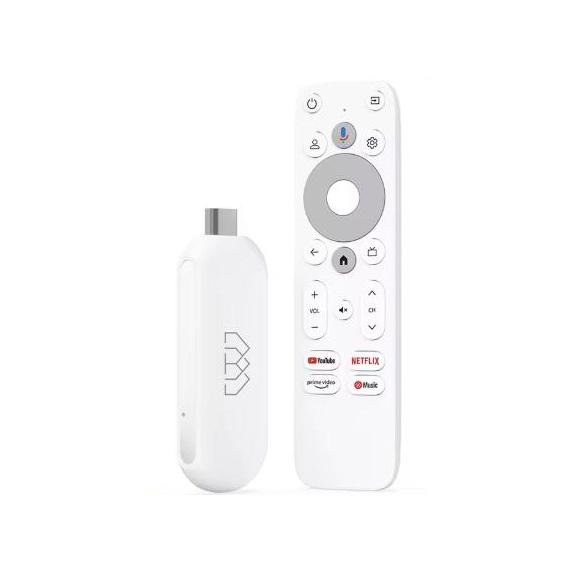
The Homatics brand has very high-quality products in its portfolio with a certified system, so you can make the most of Google TV. Homatics Stick 4K comes as a competitor to the Xiaomi TV Stick 4K, with a newer operating system Android TV 12.0 compared to Android TV 11.0, and up to 32 GB of storage instead of 8 GB.
Great price on AliExpress
Homatics Stick 4K is available exclusively on the AliExpress marketplace; other sellers don’t have it at all in their listings (only the weaker Homatics Stick HD model). It is available in a China warehouse, but with reliable customs-free Choice shipping with courier delivery in about 10 – 15 days.
Homatics Stick 4K
 15-day delivery
TIP15-day delivery via Aliexpress Standard Shipping
For this product, Aliexpress Standard Shipping is available with guaranteed delivery within 15 days. It’s the most reliable delivery method and, in most cases, it’s handled by a courier company. The 15-day delivery is something we actually tested.
When you order from a Chinese warehouse, AliExpress adds a customs fee to your cart of about €3,70 per order. When you receive the package, you don’t pay anything extra.
It’s rather strange that this device isn’t listed even on the manufacturer’s official website. If you want to find out more about it, it appears in this largest Android TV database.
Comparison: Homatics Stick 4K vs Xiaomi TV Stick 4K


| - | Homatics Stick 4K | Xiaomi TV Stick 4K | |
|---|---|---|---|
| Dimensions | 84 x 35 x 16.2 mm | 106.8 x 29.4 x 15.4 mm | |
| Weight | - | 42 | 8 g |
| Video resolution | 480i/p / 576i/p / 720p / 1080i/p / 4K | 4K | |
| CPU | Quad-core Cortex-A35 | Quad-core Cortex-A35 | |
| GPU | Mali-G31 MP2 | Mali-G31 MP2 | |
| RAM | 2 GB RAM LPDDR4 | 2 GB RAM | |
| Storage | 32 GB eMMC | 8 GB | |
| Operating system | Google TV based on Android TV 12.0 | Google TV based on Android TV 11 | |
| Wireless connectivity | 802.11b/g/n/ac 2.4G/5GHz WiFi 5 / Bluetooth 5.0 | Wi-Fi 2.4 GHz / 5 GHz / Bluetooth 5.0 | |
| Widevine level | L1 | L1 | |
| Video formats | MKV / WMV / MPG / MPEG / DAT / AVI / MOV / ISO / MP4 / RM | MKV / MPG / MPEG / DAT / AVI / MOV / ISO / MP4 / RM | |
| Video codecs | SL3000 / AV1 / VP9 / H.265 HEVC / H.264 / AVS2-P2 / MPEG-4 / MPEG-2 / MPEG-1 / RealVideo | AV1 / VP9 / H.265 HEVC / H.264 / MPEG-2 / MPEG-1 | |
| Audio formats | MP3 / AAC / WMA / RM / FLAC | MP3 / AAC / RM / FLAC | |
| Audio codecs | Dolby Atmos | DTS HD / Dolby Atmos | |
| Video output | HDMI 2.1 | HDMI 2.1 |
Decent performance and 2 GB RAM
At the core of Homatics Stick 4K is a powerful quad-core Amlogic S905Y4 processor with an ARM Cortex-A35 architecture. This chip is optimized for efficient operation of multimedia applications and supports decoding of the latest video formats, including AV1, H.265, and VP9 up to 4K resolution at 60 frames per second. Combined with the ARM Mali-G31 MP2 graphics chip, the stick delivers smooth visuals even with demanding content.


Homatics Stick 4K comes with 2 GB of LPDDR4 RAM, ensuring a fast, responsive system and apps. It also has 32 GB of internal storage (eMMC), which provides enough space to install plenty of apps or store cache for streaming services.
Certified Google TV system
The device runs on Google TV (based on Android TV version 12.0), offering a modern, clear, and intuitive user interface. The Netflix certification and support for other streaming services are also a big advantage, so you can enjoy content in high quality without restrictions. It also includes DRM support such as Widevine Level 1 and PlayReady SL3000, which is important for playing protected content in Full HD and 4K quality.


Format support
If you have movies in different formats on an external drive or USB flash drive, Homatics Stick 4K won’t disappoint you. It supports a wide range of video formats, including AVI, MKV, MP4, MOV, WMV, MPEG, and many others. For audio, the stick handles MP3, AAC, FLAC, WMA, and Ogg.
Plus, it supports Dolby Digital Plus, so you can enjoy a high-quality audio experience with 5.1 or 7.1 downmix support.
Connection and connectivity
The device offers dual-band Wi-Fi (2.4G/5GHz) with a 2T2R technology, ensuring a stable and fast internet connection. There’s also Bluetooth 5.0, so you can easily connect wireless headphones, controllers, or other devices. For output, it uses HDMI 2.1 with HDCP 2.2 support, ensuring compatibility with modern TVs.


Control
In the box, you’ll find a Bluetooth remote control with voice control, which lets you easily search for content, launch apps, and control playback. The stick also supports IR control and has a built-in antenna, so no extra cables will get in your way.
Package contents
In the package, you’ll find everything you need for immediate use:
-
1× Homatics Stick 4K
-
1× Bluetooth remote control with voice control
-
1× HDMI cable
-
1× Power adapter (5V/1A)
-
1× User manual
-
1× Box
Follow the China Planet website, sign up for our monthly newsletter, and make sure you also follow our Facebook page, the group All from EU warehouses, and join our Telegram—where we add the best deals and coupons from China day after day.
Don’t miss the best coupons 📩
Subscribe and we’ll email you new coupons before they expire. We only send it once a month — no spam.


Discussion (3)
only if I connect it to an old TV that still doesn’t have a USB input or HDMI, only SCART—can it be handled somehow?
No way—you need HDMI.
So there are no adapters? I saw that they also have them here on Heureke, for example Datacomp and other shops too. But it’s expensive—the SCART-to-HDMI converter costs around €20. That’s a lot, because you can nearly get the multimedia box itself for that. On Allegro they also sell much cheaper converters, around €5–8, but there are a lot of negative comments saying it doesn’t work or isn’t working under t&m that it won’t work and under