A planet full of gadgets from China · a database of the best coupons
Cheap gadgets

TOP 6 Cheap Gadgets from China #281

19. July 2026 4 min read 0 comments
Add us as your preferred source on Google

With another weekend here, we’ve got another episode of TOP 6 Cheap Gadgets from China, which you’ve come to love so much, and today it’s already the two hundred eighty-first installment! We picked another six interesting items from international sellers at great prices.

Join our Messenger channel

To catch the latest episode of TOP 6 cheap gadgets from China, give us a like on Facebook, join our FB group, or follow Telegram. Here we always inform you about our articles.

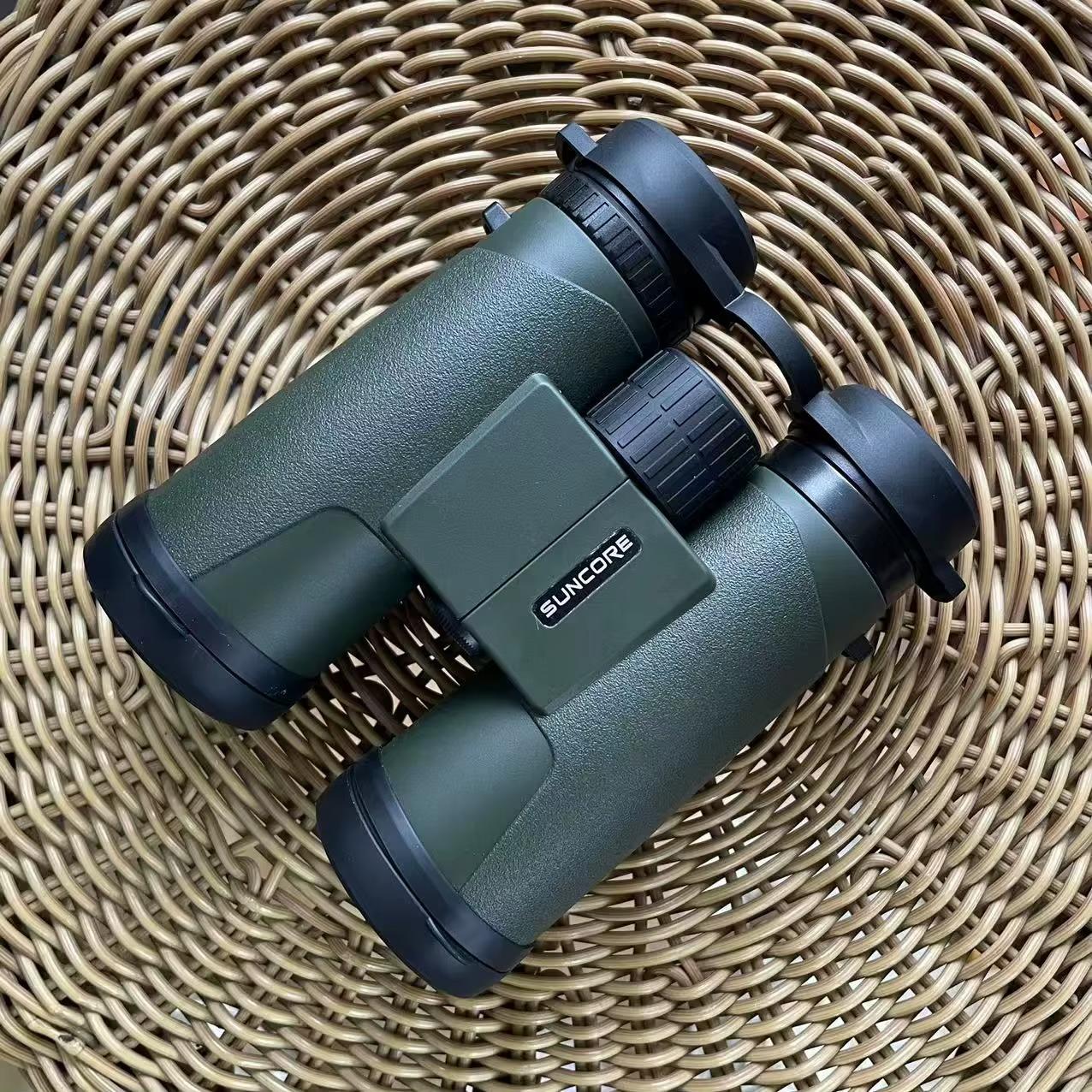
1. SUNCORE 10X42Green binoculars

The SUNCORE 10X42 Green binoculars are a great companion for hiking, nature watching, or birdwatching. They offer 10x magnification, 42 mm objective lenses, and a 114 m field of view at 1000 m, delivering a clear, sharp image even in worse lighting conditions.

Durable construction with a rubberized finish ensures a firm grip and long service life, while the central focusing and diopter correction let you quickly adjust them for any user. Given the price-to-performance ratio, they’re an excellent choice for anyone looking for a quality binocular for outdoor adventures.

ChinaPlanet deal

SUNCORE 10X42Green binoculars

Chinese warehouse
SUNCORE 10X42Green ďalekohľad
15-day delivery
41,22 €You save 2,00 €
39,22 €
Are you shopping on AliExpress for the first time? See the guide!
Updated 19. 7. 2026 at 06:09
TIP15-day delivery via Aliexpress Standard Shipping

For this product, AliExpress Standard Shipping is available with guaranteed delivery within 15 days. This is the most reliable shipping method and in most cases it’s delivered by a courier company. 15-day delivery we’ve tested it for real.

When you order from a Chinese warehouse, AliExpress adds a customs fee to your cart of about €3,70 per order. When you receive the package, you don’t pay anything extra.

Track this product’s price

As soon as we post a new coupon, we’ll send you an email. You can unsubscribe from tracking anytime.

Are you shopping on AliExpress for the first time?

The process is via the AliExpress mobile app, where most people shop. There are two key things: don’t use Buy now and enter the coupon only in the order summary, in the field Promo code. After you click Pay now, you won’t be able to add it.

  1. Copy the code and click Use discountIn our article, copy the coupon and click the button GET DISCOUNT. The link will take you directly to the product in the AliExpress app.
  2. Use Add to cart instead of Buy nowOn the product card, scroll down and tap Add to cart. Don’t use the Buy now button—you’ll skip the cart, and later you won’t have anywhere to enter the coupon. Before that, double-check the variant: the color, the version, and whether it ships from an EU warehouse.
  3. Through the cart, go to CheckoutA pop-up will appear: Added to cart! — tap Check it out in it. If it disappeared, open the cart with the icon at the bottom right. In the cart, check the product and quantity, then click the red Checkout. Only the items marked with the red ring will be applied.
  4. Enter your address and card, then look for Promo codeIn the order summary, first fill in the delivery address and payment card at the top. Below them there’s a line Promo code — expand it with the arrow on the right.
    Riadok Promo code v zhrnutí objednávky v aplikácii AliExpress
    Look for this line under the address and payment method.
  5. Paste the code and confirm ApplyIn the field Promo code paste the copied code and click the black Apply. The code is case-sensitive and must not contain spaces.
    Políčko Promo code s kódom a tlačidlom Apply v aplikácii AliExpress
    Paste the code into the field and confirm with the Apply button.
  6. Check the savings and payIn the Summary expand the line Saved — you’ll see the applied coupon there as AliExpress coupons/codes. Only when Total is really lower, click Pay now.
    Riadok Saved s uplatneným kupónom a znížený Total v aplikácii AliExpress
    The applied coupon will appear in the Saved line and will reduce the Total.
Apply the discount already at the order summary. After you click Pay now, you can no longer add a coupon. If Apply shows an error, the code has either expired, doesn’t apply to your items, or the order doesn’t meet the minimum amount.
The Store Coupon also goes in the same field. — a coupon from the seller itself, which isn’t always available and changes from day to day. AliExpress coupons can’t be combined, so try both and go with the one that gives you more. Coins are added automatically.

Ad

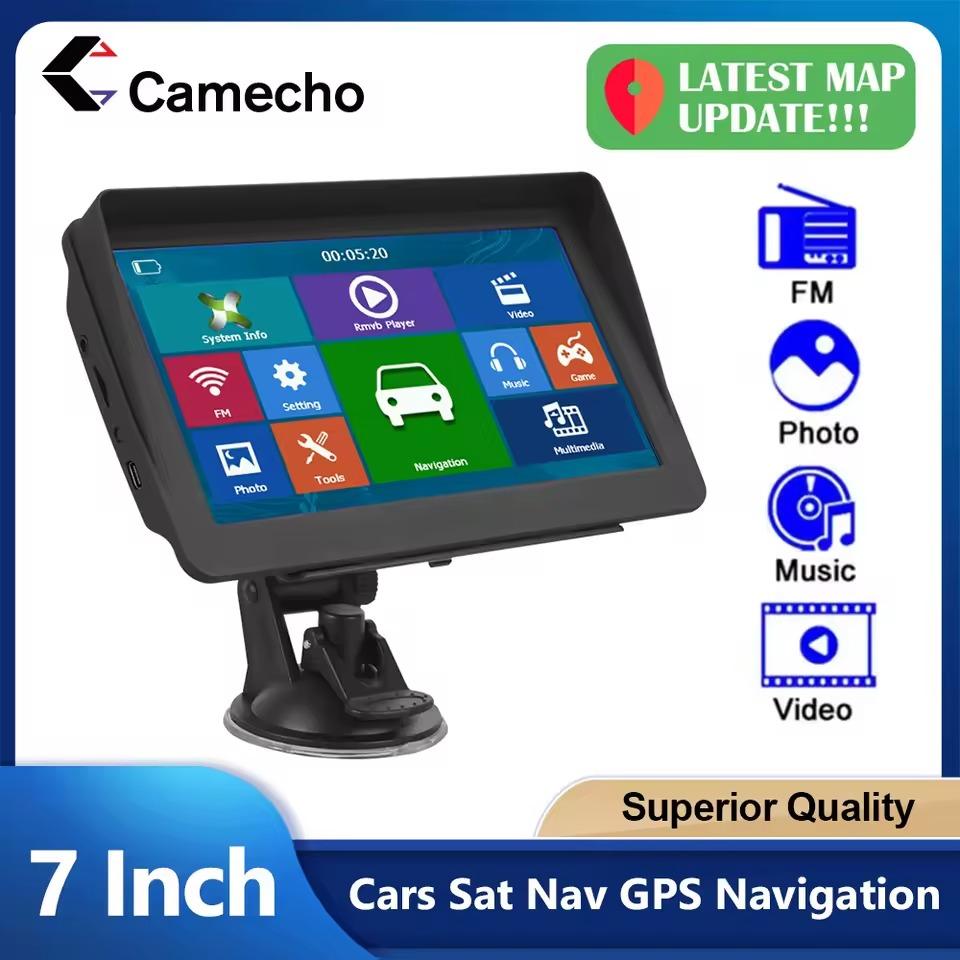
2. Camecho 7” car display with FM and GPS

The Camecho 7″ GPS navigation is an affordable solution for anyone who wants reliable navigation without depending on a mobile phone. It offers a 7-inch touchscreen display, offline GPS maps of Europe, Slovak menu and voice guidance, and also a FM transmitter that plays directions or music directly through your car speakers.

Besides navigation, it also serves as a multimedia center with support for video, music, photos, and e-books. Thanks to 8 GB of storage, the option to expand via a microSD card, and the rich accessories included in the box, it’s a practical gadget at a very attractive price.

ChinaPlanet deal

Camecho 7'' car display with FM and GPS

Chinese warehouse
Camecho 7'' displej do auta s FM aj GPS
15-day delivery
44,77 €You save 2,00 €
42,77 €
Are you shopping on AliExpress for the first time? See the guide!
Updated 19. 7. 2026 at 06:09
TIP15-day delivery via Aliexpress Standard Shipping

For this product, AliExpress Standard Shipping is available with guaranteed delivery within 15 days. This is the most reliable shipping method and in most cases it’s delivered by a courier company. 15-day delivery we’ve tested it for real.

When you order from a Chinese warehouse, AliExpress adds a customs fee to your cart of about €3,70 per order. When you receive the package, you don’t pay anything extra.

Track this product’s price

As soon as we post a new coupon, we’ll send you an email. You can unsubscribe from tracking anytime.

Are you shopping on AliExpress for the first time?

The process is via the AliExpress mobile app, where most people shop. There are two key things: don’t use Buy now and enter the coupon only in the order summary, in the field Promo code. After you click Pay now, you won’t be able to add it.

  1. Copy the code and click Use discountIn our article, copy the coupon and click the button GET DISCOUNT. The link will take you directly to the product in the AliExpress app.
  2. Use Add to cart instead of Buy nowOn the product card, scroll down and tap Add to cart. Don’t use the Buy now button—you’ll skip the cart, and later you won’t have anywhere to enter the coupon. Before that, double-check the variant: the color, the version, and whether it ships from an EU warehouse.
  3. Through the cart, go to CheckoutA pop-up will appear: Added to cart! — tap Check it out in it. If it disappeared, open the cart with the icon at the bottom right. In the cart, check the product and quantity, then click the red Checkout. Only the items marked with the red ring will be applied.
  4. Enter your address and card, then look for Promo codeIn the order summary, first fill in the delivery address and payment card at the top. Below them there’s a line Promo code — expand it with the arrow on the right.
    Riadok Promo code v zhrnutí objednávky v aplikácii AliExpress
    Look for this line under the address and payment method.
  5. Paste the code and confirm ApplyIn the field Promo code paste the copied code and click the black Apply. The code is case-sensitive and must not contain spaces.
    Políčko Promo code s kódom a tlačidlom Apply v aplikácii AliExpress
    Paste the code into the field and confirm with the Apply button.
  6. Check the savings and payIn the Summary expand the line Saved — you’ll see the applied coupon there as AliExpress coupons/codes. Only when Total is really lower, click Pay now.
    Riadok Saved s uplatneným kupónom a znížený Total v aplikácii AliExpress
    The applied coupon will appear in the Saved line and will reduce the Total.
Apply the discount already at the order summary. After you click Pay now, you can no longer add a coupon. If Apply shows an error, the code has either expired, doesn’t apply to your items, or the order doesn’t meet the minimum amount.
The Store Coupon also goes in the same field. — a coupon from the seller itself, which isn’t always available and changes from day to day. AliExpress coupons can’t be combined, so try both and go with the one that gives you more. Coins are added automatically.

3. HiMISS 200x125cm parasol

HiMISS 200 × 125 cm is a practical balcony parasol that provides pleasant shade even on smaller terraces or balconies. It offers UPF 50+ UV protection, a height-adjustable frame ranging from 145 to 225 cm, and a tilt angle of up to 45°, so you can adjust the shade to the sun’s position.

Thanks to a sturdy steel construction, durable polyester fabric, and a universal railing mount, it’s stable and easy to install. A big bonus is the portable bag, which makes the parasol easy to carry and store.

ChinaPlanet deal

HiMISS 200x125cm parasol

EU warehouse
HiMISS 200x125cm slnečník
PL warehouse
41,87 €You save 2,00 €
39,87 €
Are you shopping on AliExpress for the first time? See the guide!
Updated 19. 7. 2026 at 06:11
TIPExpress delivery from the Polish warehouse with no customs duty and VAT.

This product will be delivered to you express from a local Polish warehouse. Delivery from Poland usually takes 7–10 days and is handled by a courier. When it’s delivered, you won’t pay any additional fees—no customs duty and no VAT.

Track this product’s price

As soon as we post a new coupon, we’ll send you an email. You can unsubscribe from tracking anytime.

Are you shopping on AliExpress for the first time?

The process is via the AliExpress mobile app, where most people shop. There are two key things: don’t use Buy now and enter the coupon only in the order summary, in the field Promo code. After you click Pay now, you won’t be able to add it.

  1. Copy the code and click Use discountIn our article, copy the coupon and click the button GET DISCOUNT. The link will take you directly to the product in the AliExpress app.
  2. Use Add to cart instead of Buy nowOn the product card, scroll down and tap Add to cart. Don’t use the Buy now button—you’ll skip the cart, and later you won’t have anywhere to enter the coupon. Before that, double-check the variant: the color, the version, and whether it ships from an EU warehouse.
  3. Through the cart, go to CheckoutA pop-up will appear: Added to cart! — tap Check it out in it. If it disappeared, open the cart with the icon at the bottom right. In the cart, check the product and quantity, then click the red Checkout. Only the items marked with the red ring will be applied.
  4. Enter your address and card, then look for Promo codeIn the order summary, first fill in the delivery address and payment card at the top. Below them there’s a line Promo code — expand it with the arrow on the right.
    Riadok Promo code v zhrnutí objednávky v aplikácii AliExpress
    Look for this line under the address and payment method.
  5. Paste the code and confirm ApplyIn the field Promo code paste the copied code and click the black Apply. The code is case-sensitive and must not contain spaces.
    Políčko Promo code s kódom a tlačidlom Apply v aplikácii AliExpress
    Paste the code into the field and confirm with the Apply button.
  6. Check the savings and payIn the Summary expand the line Saved — you’ll see the applied coupon there as AliExpress coupons/codes. Only when Total is really lower, click Pay now.
    Riadok Saved s uplatneným kupónom a znížený Total v aplikácii AliExpress
    The applied coupon will appear in the Saved line and will reduce the Total.
Apply the discount already at the order summary. After you click Pay now, you can no longer add a coupon. If Apply shows an error, the code has either expired, doesn’t apply to your items, or the order doesn’t meet the minimum amount.
The Store Coupon also goes in the same field. — a coupon from the seller itself, which isn’t always available and changes from day to day. AliExpress coupons can’t be combined, so try both and go with the one that gives you more. Coins are added automatically.

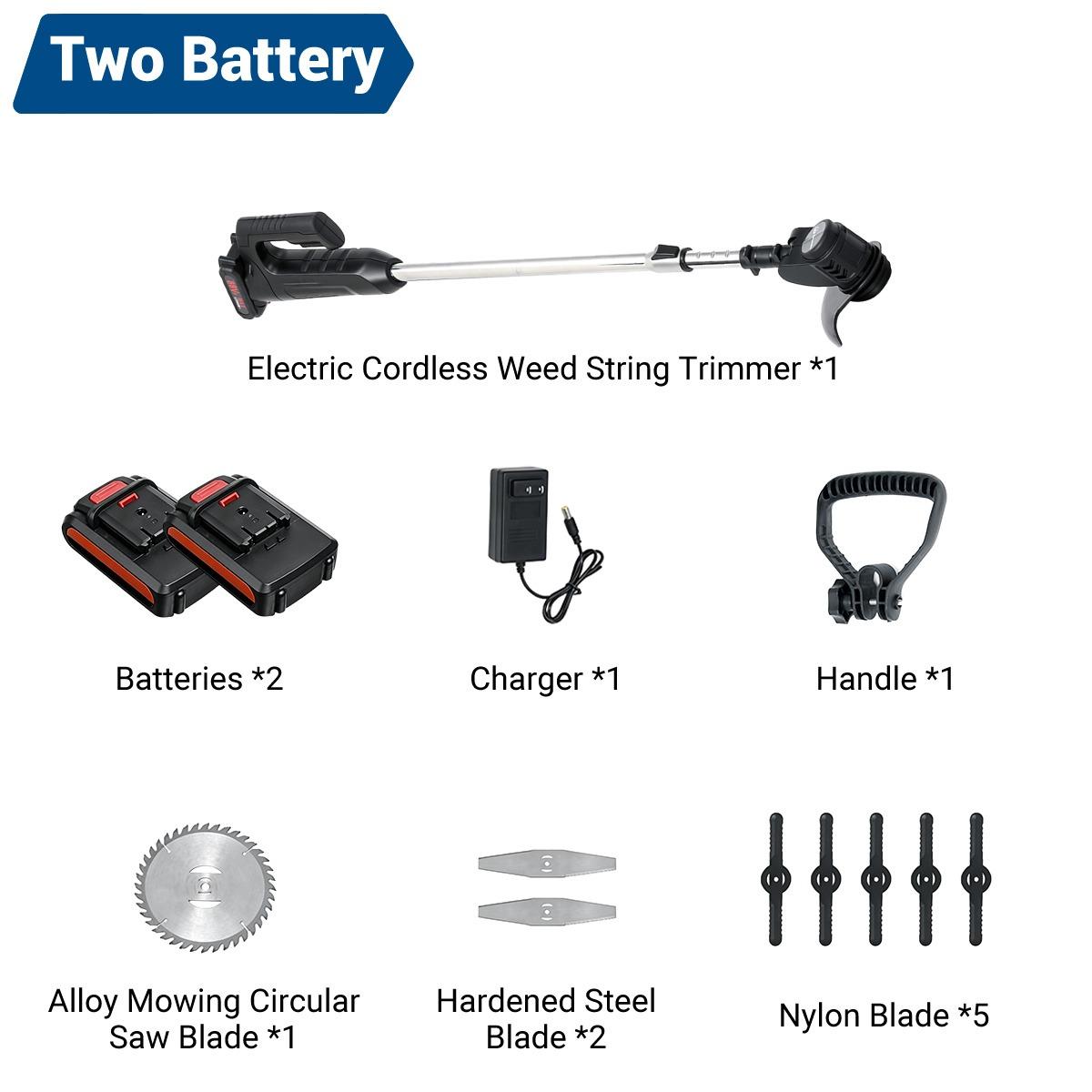
4. Drillpro 18V Cordless string trimmer

The Drillpro 18V Cordless string trimmer is a versatile helper for garden maintenance, offering 1000 W of power, speeds of up to 10,000 rpm, and a telescopic handle adjustable from 90 to 120 cm. The package includes different blade types for grass, weeds, and denser growth, and the version with two 2.5 Ah batteries compatible with the Makita system ensures longer work without interruptions.

Thanks to its low weight, rotating head, auxiliary handle, and cordless design, it’s comfortable to use even on slopes, around flower beds, or along curbs. Safety is improved by the dual-trigger system and the protective cover, which prevents cut grass from flying around.

Important: Orders from Banggood come with our VIP support, which you get after downloading our extension for the Chrome browser on desktop only.
ChinaPlanet deal

Drillpro 18V Cordless string trimmer

EU warehouse
Drillpro 18V Aku strunová kosačka
EU warehouse
44,78 €You save 16,69 €
28,09 €
CouponBG50a8b7
Buying on Banggood for the first time? See the guide!
Updated 19. 7. 2026 at 06:12
TIPExpress delivery from a European warehouse without customs duty and VAT.

This product will be delivered to you express from a local warehouse in Europe. Delivery from EU warehouses usually takes 2–10 days and is handled by courier. When it arrives, you won’t pay any additional fees — no customs duty and no VAT.

Track this product’s price

As soon as we post a new coupon, we’ll send you an email. You can unsubscribe from tracking anytime.

Buying on Banggood for the first time?

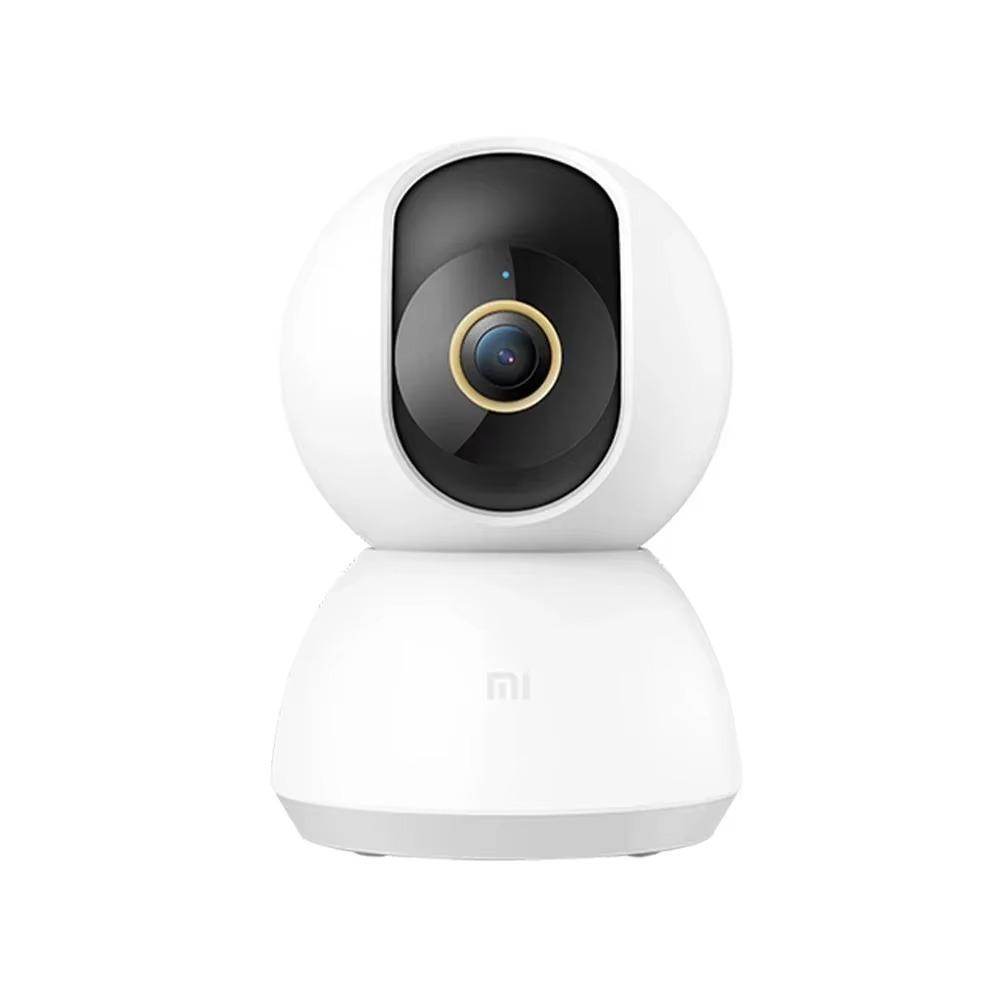
5. Xiaomi Smart Home 360° camera

This indoor Xiaomi camera is a great solution for anyone who wants to keep an eye on their home for minimal money.

It offers 2K resolution (2304 × 1296 px), 360° pan-and-tilt, AI motion and person detection, color night vision, and two-way voice communication via the Mi Home app. Thanks to support for microSD cards up to 256 GB, H.265 compression, and integration with the Xiaomi ecosystem, it’s an outstanding security camera with an excellent price-to-features ratio.

ChinaPlanet deal

Xiaomi Smart Home 360° camera

CN stock
Xiaomi Smart Home 360° kamera
15-day delivery
40,44 €You save 2,00 €
38,44 €
Are you shopping on AliExpress for the first time? See the guide!
Updated 19. 7. 2026 at 06:13
TIP15-day delivery via Aliexpress Standard Shipping

For this product, AliExpress Standard Shipping is available with guaranteed delivery within 15 days. This is the most reliable shipping method and in most cases it’s delivered by a courier company. 15-day delivery we’ve tested it for real.

When you order from a Chinese warehouse, AliExpress adds a customs fee to your cart of about €3,70 per order. When you receive the package, you don’t pay anything extra.

Track this product’s price

As soon as we post a new coupon, we’ll send you an email. You can unsubscribe from tracking anytime.

Are you shopping on AliExpress for the first time?

The process is via the AliExpress mobile app, where most people shop. There are two key things: don’t use Buy now and enter the coupon only in the order summary, in the field Promo code. After you click Pay now, you won’t be able to add it.

  1. Copy the code and click Use discountIn our article, copy the coupon and click the button GET DISCOUNT. The link will take you directly to the product in the AliExpress app.
  2. Use Add to cart instead of Buy nowOn the product card, scroll down and tap Add to cart. Don’t use the Buy now button—you’ll skip the cart, and later you won’t have anywhere to enter the coupon. Before that, double-check the variant: the color, the version, and whether it ships from an EU warehouse.
  3. Through the cart, go to CheckoutA pop-up will appear: Added to cart! — tap Check it out in it. If it disappeared, open the cart with the icon at the bottom right. In the cart, check the product and quantity, then click the red Checkout. Only the items marked with the red ring will be applied.
  4. Enter your address and card, then look for Promo codeIn the order summary, first fill in the delivery address and payment card at the top. Below them there’s a line Promo code — expand it with the arrow on the right.
    Riadok Promo code v zhrnutí objednávky v aplikácii AliExpress
    Look for this line under the address and payment method.
  5. Paste the code and confirm ApplyIn the field Promo code paste the copied code and click the black Apply. The code is case-sensitive and must not contain spaces.
    Políčko Promo code s kódom a tlačidlom Apply v aplikácii AliExpress
    Paste the code into the field and confirm with the Apply button.
  6. Check the savings and payIn the Summary expand the line Saved — you’ll see the applied coupon there as AliExpress coupons/codes. Only when Total is really lower, click Pay now.
    Riadok Saved s uplatneným kupónom a znížený Total v aplikácii AliExpress
    The applied coupon will appear in the Saved line and will reduce the Total.
Apply the discount already at the order summary. After you click Pay now, you can no longer add a coupon. If Apply shows an error, the code has either expired, doesn’t apply to your items, or the order doesn’t meet the minimum amount.
The Store Coupon also goes in the same field. — a coupon from the seller itself, which isn’t always available and changes from day to day. AliExpress coupons can’t be combined, so try both and go with the one that gives you more. Coins are added automatically.

Ad

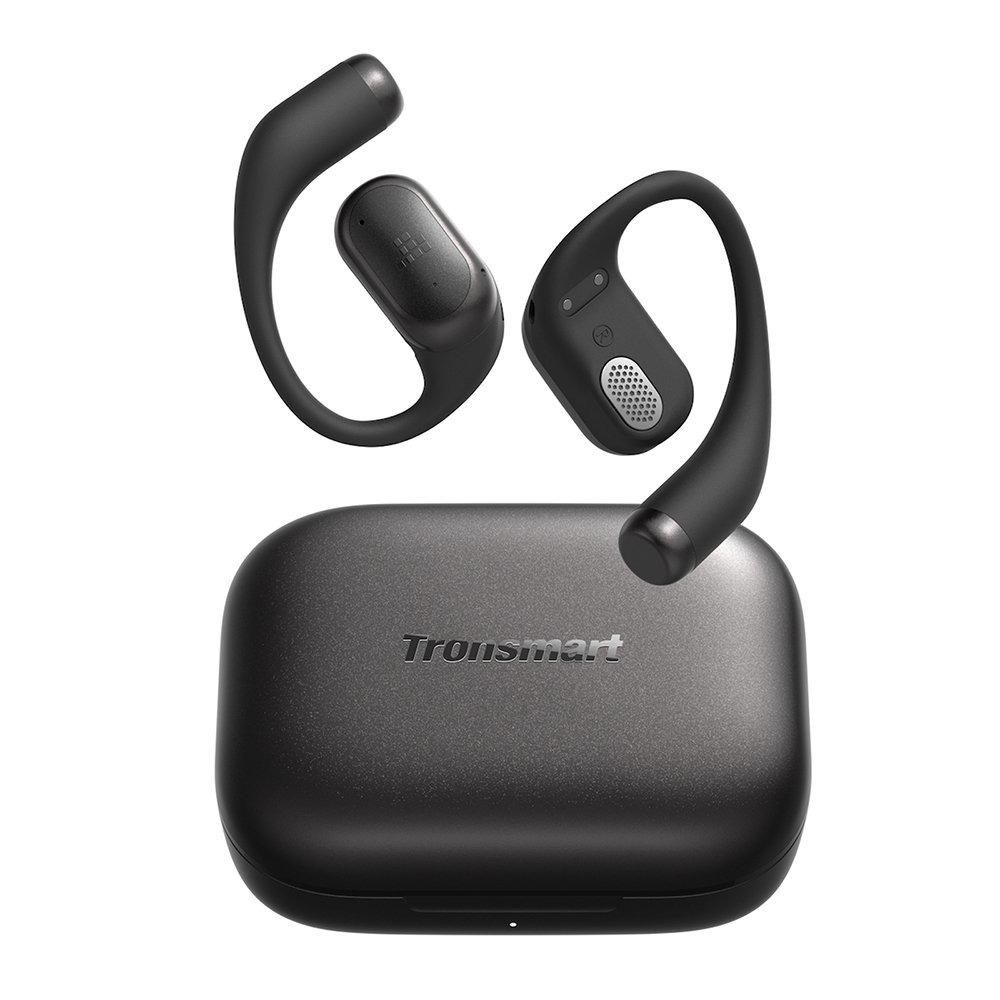
6. Tronsmart OpenFly 2 Pro

The Tronsmart OpenFly 2 Pro headphones use an open design, so you stay connected to your surroundings even while working out, cycling, or walking around the city.

They feature 12 mm drivers with SoundPulse technology, abTube technology to help limit sound leakage, 4 microphones with AI noise cancellation, and up to 10 hours of battery life on a single charge—up to 40 hours with the charging case.

Important: Orders from Geekbuying come with our VIP support, which you get after downloading our extension for the Chrome browser on desktop only (for this store, never shop through the app). Right after payment, send us your order number so we can check that VIP support is valid!
ChinaPlanet deal

Tronsmart OpenFly 2 Pro

EU warehouse
Tronsmart OpenFly 2 Pro
EU warehouse
39,00 €You save 3,01 €
35,99 €
CouponGKBSM02
Is it your first time shopping on Geekbuying? See the guide!
Updated 19. 7. 2026 at 06:15
TIPExpress delivery from a European warehouse without customs duty and VAT.

This product will be delivered to you express from a local warehouse in Europe. Delivery from EU warehouses usually takes 2–10 days and is handled by courier. When it arrives, you won’t pay any additional fees — no customs duty and no VAT.

Track this product’s price

As soon as we post a new coupon, we’ll send you an email. You can unsubscribe from tracking anytime.

Is it your first time shopping on Geekbuying?

Got a tip for us? Send it to us via our form!

Follow the China Planet website, subscribe to our monthly newsletter, and be sure to check out our Facebook page, the China Planet group, and join our Telegram, where we add the best offers and coupons from China every single day.

Add us as your preferred source on Google

Don’t miss the best coupons 📩

Subscribe and we’ll email you new coupons before they expire. We only send it once a month — no spam.

Discussion (0)

Comments are approved by the editorial team before publishing — yours will usually appear within a few hours.