


Verdict: TicWatch Atlas
Our editorial rating is based on product testing.
- Nice and durable build
- Energy-saving screen included
- Long battery life with an open operating system
- NFC payments and good connectivity
- The wrist sweats a bit with the silicone strap
- Poor sleep detection and tracking
- Limited compatibility (only Android with built-in Google services)
Watches from Mobvoi have long been among our favorites. The new TicWatch Atlas was the subject of our recent testing, and once again it didn’t disappoint. It uses a proven design and still features an energy-saving FSTN panel and the Wear OS operating system, which significantly expands what you can do with these smartwatches. You can find the details in the just-starting review of Mobvoi TicWatch Atlas.
The watches are sold directly in the official Mobvoi e-shop
These rugged smartwatches are currently available in the official Mobvoi brand store. A great bonus is that they’re available directly from an EU warehouse, so you can expect them at home already within 2–4 business days after dispatch.
To get the listed price in the Mobvoi store’s price box, you need to do the following:
- Create a new account on the website using this link and then sign in
- Use the coupon from the price box
- In your cart, you automatically get an 11.97 € discount for new users
TicWatch Atlas

TIPShipping is completely free.
For this product, shipping is available completely free of charge. However, this is the slowest delivery method, and the item may take 20 days to 1 month to arrive.
When you order from a Chinese warehouse, AliExpress adds a customs fee to your cart of about €3,70 per order. When you receive the package, you don’t pay anything extra.
TIPShipping is completely free.
For this product, shipping is available completely free of charge. However, this is the slowest delivery method, and the item may take 20 days to 1 month to arrive.
When you order from a Chinese warehouse, AliExpress adds a customs fee to your cart of about €3,70 per order. When you receive the package, you don’t pay anything extra.
Technical specifications
| Model | TicWatch Pro 5 Enduro |
|---|---|
Dimensions | 52.2 x 47.8 x 12.05 mm |
Weight | 47.2 g |
Material | Stainless steel + 7000-series aluminum + nylon |
Protective glass | Sapphire crystal |
Strap | 24 mm rubber |
Operating system | Wear OS 4 |
Processor | Snapdragon W5+ Gen 1 |
Memory | 2 GB RAM + 32 GB storage |
Display | 1.43 inches with a resolution of 466 x 466 px |
Density 326 ppi | |
Color OLED with Always On + Ultra-efficient FSTN display | |
Connectivity | Bluetooth 5.2 + Wi-Fi (2.4 GHz) |
GNSS | GPS + Beidou + Glonass + Galileo + QZSS |
NFC | Yes (Google Wallet support – 13.56 MHz) |
Speaker | Yes |
Microphone | Yes |
Vibration motor | Yes |
Barometer | Yes |
Sensors | accelerometer; gyroscope; HD PPG heart-rate sensor; SpO2 sensor; temperature sensor; barometer; compass |
Battery | 628 mAh |
Water resistance | 5 ATM |
Other durability certifications | MIL-STD-810H |
App | Mobvoi Health |
Package contents
In the long box, besides the watch itself, you’ll also find a charging cable with two pins. It connects to the device from the bottom magnetically. The box is decorated with an image of TicWatch Atlas. Inside, you’ll also find a brief quick-start guide. This guide also includes Czech.

Design and build quality
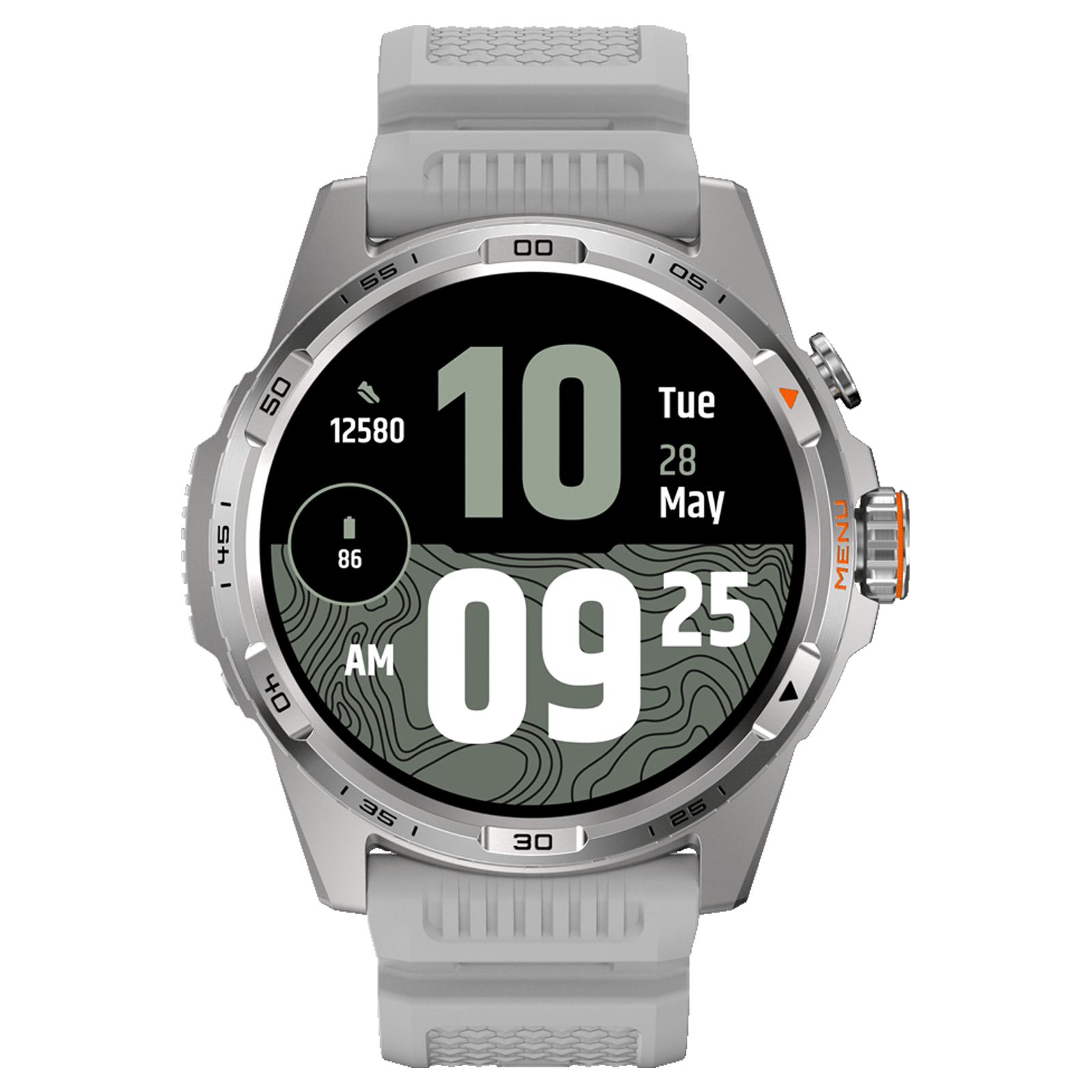
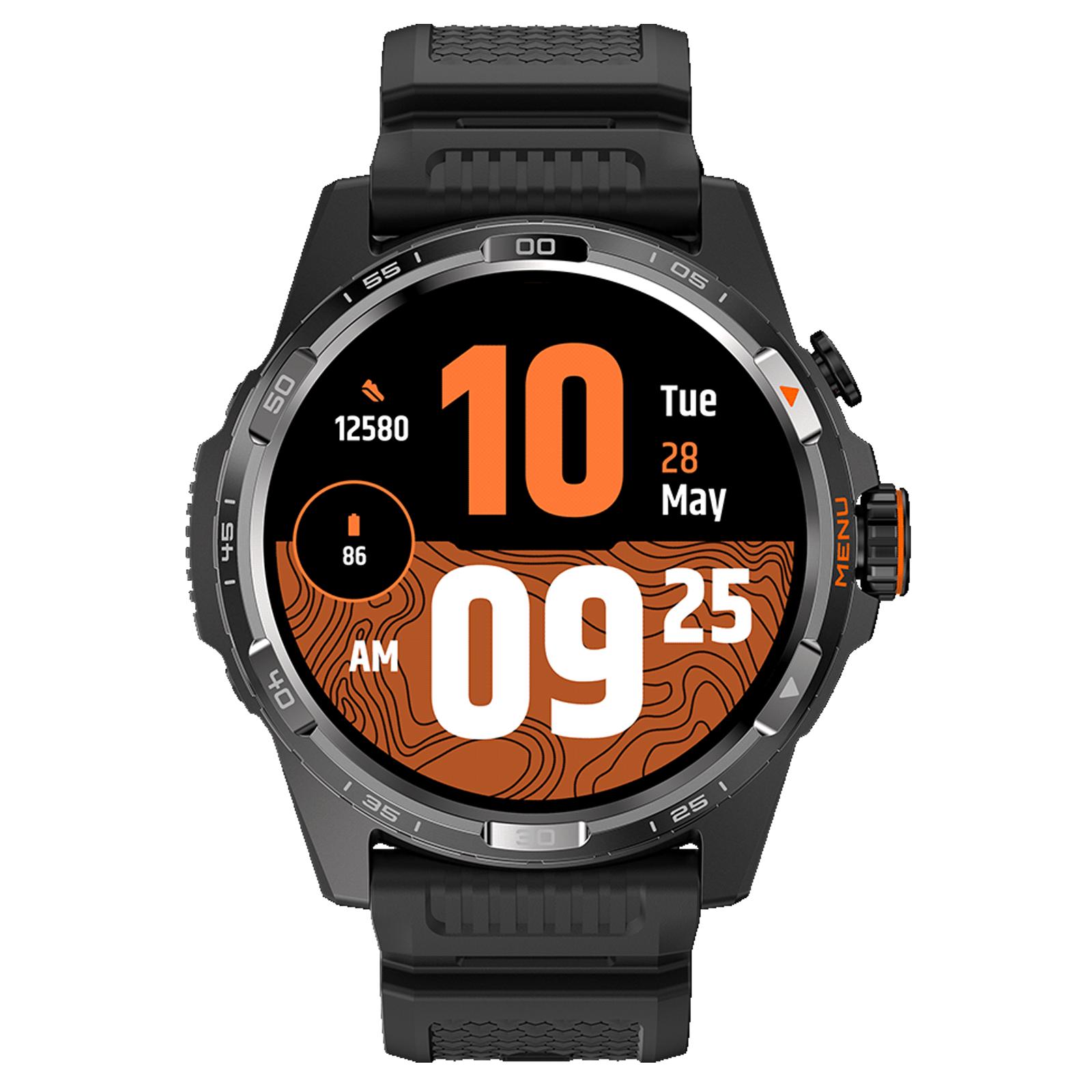
The look of the new model really impressed us right after unboxing. With its black finish, it goes well with any outfit. It also has subtle red accents that give it a more sporty appearance. After all, they’re designed specifically for sports. On the fixed bezel around the display, you’ll find numbers from “00” to “55”, which indicate the value of the second hand when you choose this type of watch face.

Judging by the design, TicWatch Atlas will appeal more to men. There’s also a silver version, which is tuned to look even more sporty. The silver elements are matte, and in our opinion, other watches may suit ladies better.

A 24 mm rubber strap attaches to the TicWatch Atlas. The device body is made of stainless steel. The display is protected by a sapphire crystal lens, which is also available on the model TicWatch Pro 5 Enduro. High durability is further confirmed by the military standard MIL-STD-810H. You don’t need to worry about using the watch while swimming in a pool or showering—it's water-resistant up to 5 ATM. With dimensions of 52.2 x 47.8 x 12.05 millimeters and a weight of 47.2 grams (without the strap), it’s a reasonably large watch. On your wrist, people around you will definitely notice it easily.

Two physical control elements are located on the right side. The most noticeable one is the rotating crown in the middle with a red element and the “Menu” label. It has fine ridges that make it easier to grip and, slightly, easier to feel the crown by touch. Above it, there is a secondary, less prominent button. It also serves to turn the watch on or off. Just press and hold it for 3 seconds.

Comfort on the wrist is average. The rubber strap has its pluses—high durability, suitability for sports, and it looks quite good overall. The traditional downside is increased wrist sweating, especially during physical activity. The material doesn’t irritate the skin, but after removing the watch, you’ll see a pattern from the strap on your skin, and you may feel the typical mild itching. This is only short-term and is caused by the tighter fit of the device on your wrist.
First power-on and pairing with your smartphone
The initial setup is again very simple. An Android device can automatically detect the new watch with the Wear OS operating system that’s nearby. After tapping the relevant notification in the status bar, pairing is completed via Bluetooth. You only had to confirm that the code on your phone screen matches the one on the watch. If that doesn’t happen, register and connect the device manually through the Mobvoi Health app.

Note: the watch works only with a smartphone that has native support for Google Services. We tried pairing the TicWatch Atlas with a smartphone that has a Chinese ROM, but it didn’t work. The manually installed Google Services with Mobvoi Health don’t cooperate, and there’s probably no solution for this issue. It’s also important to mention that iOS devices are not supported.
The initial setup process will be guided by the app’s English text. The watch is set up largely through your phone, from which you’ll sign in to the watch with your Google account to connect to Google services such as Google Play or Google Wallet (Google Wallet). During the initial setup, you’ll also be offered Wear OS versions of the apps from your smartphone. You’ll then be introduced to navigation in the system. Tapping the crown takes you to the menu with all installed apps.

If you’re in any of them, tapping the crown will take you back to the home screen. Rotating this control lets you “scroll” through options or change certain values—such as the timer duration or the exact time when your alarm should ring. A double-press lets you quickly jump to the last-used app, and if you press the crown 5 times in quick succession, it will start an SOS emergency call. With the top button, you can open an overview menu with your most recently used apps.
Operating system, pre-installed apps and NFC payments
The WearOS operating system is pre-installed in version 4.0. It’s an open platform, so you can install third-party apps on the watch. Of course, you’ll install them from the Google Play Store. There’s an extremely large number of apps for different purposes. The advantage is the ability to pay by card via NFC using Google Wallet. Just make sure NFC is enabled and, before making a payment, open the app of the mentioned service.

By double-pressing the top hardware button, you’ll immediately be taken—by default—to the app, and you can pay. This saves a relatively large amount of time before payment. A condition for making payments with the watch is setting a PIN code to unlock the watch display. Of course, that’s a security measure. The PIN code will be requested after you take the watch off your wrist, or after a system restart.

Payment went through smoothly, and the only exception was a specific grocery store where the terminals reject all Wear OS watches. This is an issue on the seller’s side, or rather with their terminals. If you want to customize the watch’s software look, the most noticeable personalization option is changing the digital watch face. According to the manufacturer, you can choose from over 7000 of them, so you really have plenty to pick from. Over time, the number will only keep growing.

You can choose from them via the app on your smartphone, or in Google Play directly on the watch. The ones you transfer to the watch can also be changed right from the watch face. Many watch faces, including the default one, show information such as the time, date, number of steps taken, battery level, heart rate, or air pressure.
You can find the full catalog of the Google Play Store for watches through this link. To change watch faces, press and hold on the home screen and “swipe” through the pages. Then tap the specific one you want to set.

After you press the crown on the home screen, you’ll see a menu with apps. The pre-installed apps were these:
Alarm clock | Calculator | Timer | Hand-washing timer | Essential mode settings |
Flashlight | Contacts | Maps | Mobvoi Privacy | Mobvoi Treadmill |
Find my phone | Settings | Play Store | One-tap measurement | Media controls |
Google Wallet | Weather | Schedule | Spotify | Messages |
Stopwatch | Phone | TicBarometer | TicBreathe | TicCare |
TicCompass | TicExercise | TicHealth | TimeShow | YouTube Music |
Notifications, replies from the watch, and calls
Notifications from various apps come through reliably. The watches display emojis nicely, and even show the photos you receive. From the watch you can reply using the virtual keyboard or even by voice. We never had any issues with notifications. The problems with the Messenger app that we saw in the past are fortunately gone too.

Bluetooth calls from the connected smartphone work really well. The other side could hear us clearly, and we could hear them just as clearly. For this purpose, the watch speaker is loud and clear enough. Calling works exclusively by transmitting audio information over Bluetooth. The watches do not support eSIM.


If you get a call on your connected phone, the watch will alert you with a vibration and show basic information like the contact name—or the phone number if it’s an unknown caller. Calls can be accepted or rejected directly from the watch display.
Performance and connectivity
TicWatch Atlas are equipped with a Qualcomm Snapdragon W5+ Gen 1 chip, 2 GB of RAM, and 32 GB of internal storage. Basic connectivity is available, including Bluetooth 5.2 and 2.4 GHz Wi‑Fi. Location tracking is handled via GPS, Beidou, Glonass, Galileo, and also QZSS. It depends on which part of the world you’re in.
If you have the watch connected to Wi‑Fi, and the paired smartphone isn’t with you at the moment but is connected to the internet, it will send notifications to the watch. We used this feature, for example, at the gym: the phone stayed at home, and the watches were connected to the gym’s Wi‑Fi, so we could communicate through them if needed. Great feature if you find the right way to use it.

The OS is really well-tuned, and you never have to wait around for anything. Animations are smooth, apps don’t crash, and they’re a pleasure to use. You can also thank the powerful—yet power-efficient—hardware. We didn’t have any problems with Bluetooth connectivity either, and the watches stayed connected to the phone even over longer distances, which is definitely a plus.
Battery life, Essential Mode, displays, and charging
With an open operating system like Wear OS 4.0, the battery lasts an impressively long time. With heavy usage, TicWatch Atlas managed to reach three days of battery life. If we toned it down—for example, not monitoring workouts during the day—battery life went up to as much as 4 days. 5 days is only realistic if the watch isn’t connected to your smartphone all the time and you frequently use the Essential Mode. But then you’ll lose the vast majority of their features.

When we mention the Essential Mode, it drastically limits several watch features to radically improve the TicWatch Atlas battery life on a single charge. This is one of the reasons why they last so long. The mode activates automatically, for example at night or based on settings you define, such as the battery charge percentage.

Essential Mode is even more restrictive. If you used the watch only in this mode, you could get up to a 90-day battery life according to the manufacturer. In Essential Mode, the watch shows only the date and time, counts steps, and monitors your heart rate and sleep. In short: you only get a power-saving display and the functions shown on it, including a compass.

The second factor that helps with such long battery life is the secondary FSTN display, which shows the basic information. It replaces the Always On display and features simple backlighting—the color reflects your heartbeat and therefore the intensity of the physical activity you’re doing at that moment.
By turning the crown, you can switch the display from showing the time to showing current heart rate data, calories burned during the day, your blood oxygen level—or you can see the compass, i.e., your current orientation to the cardinal directions in degrees. By tapping the display or pressing the hardware button, you activate the main, colorful OLED display. Charging is done via a USB cable that you must plug into either an adapter or a computer. Power delivery is relatively fast and takes about 30 minutes.
Sports activity recording
We measured physical activity during walking, cycling, and at the gym. We noticed not very accurate heart-rate readings. More precise measurements will come when you place the watch as close to your wrist as possible. If you’re used to wearing it a bit higher, farther from the wrist than we did, we noticed that the measurement won’t be as accurate across the full range.

Short pulse spikes during workouts are especially worse. For example, when measuring heart rate on a treadmill where your heart rate stays consistently higher, the measurement is more accurate. We verified the results using the heart-rate display on a treadmill and also on another smartwatch—specifically the Apple Watch Ultra. The watch supports tracking many sports. We’re almost sure you’ll find your favorite one here.


TicWatch Atlas will record various data, such as average speed, top speed, map location (Google provides the map view), average and maximum heart rate together with labeled heart-rate training zones based on your heart-rate frequency, total distance covered, and of course training time, calories burned, step count, and blood oxygen saturation.

In the app, you can also see the time needed to recover after the workout. As you can see in the screenshots below, small route changes are clearly visible on the map—however, sometimes our trajectory ran into physical obstacles such as buildings. We don’t know whether this is a map display error or an incorrectly detected location. Insight into recorded activities and other statistics is also provided by the watch itself, but you’ll see more details in the mobile app.


Monitoring sleep and other body functions
Again, we encountered very poor sleep monitoring. The recording starts automatically about halfway through your sleep. If you set manual monitoring before sleep, you’ll also get an audio recording of your snoring, and the smartphone’s microphone will detect other sounds you make during sleep—for example, it can help you find out that you talk in your sleep. When automatic sleep tracking works, in the morning you’ll see a pretty nice, complete overview of how you slept.


The app evaluates your sleep quality in percentages and shows information about the different sleep stages you went through during the night. During the night, it also measures data such as heart rate, blood oxygenation, breathing rate, skin temperature, and the average time it takes to fall asleep / wake up. These data would make more sense if the automatic tracking worked properly, or if you enable monitoring manually. Even disabling Essential Mode before bed didn’t help us.


In the screenshots below, you can see a weekly display of activity stats and monitoring of other body functions. In this section of the Mobvoi Health app, you can get information about your total steps, minutes spent exercising, active hours not spent sitting, heart-rate history, or the average number of floors climbed per day.


TicWatch Atlas review: Final verdict
Thanks to the great price, excellent features, the presence of an open operating system WearOS, and impressive battery life, there’s nothing left for us to do but recommend these watches to most users. Another advantage is their nice design that blends sport with elegance, along with a durable build. Plus, the display is protected by a tough sapphire crystal, which always pleases us. So there’s no need for any additional screen protection.

NFC payments work reliably, notification delivery is stable, and it lets you respond to messages right from your wrist. The same is true for phone calls. Tracking physical activity and body stats is clear and works relatively well. It’s worse when it comes to sleep, or rather its automatic detection. Overall, though, it’s a very good product that wins you over not only with the price, but also with many of its advantages—which, in our opinion, outweigh the downsides.
If our review convinced you to buy these watches, you can do it through Mobvoi’s official European store.
TicWatch Atlas
TIPShipping is completely free.
For this product, shipping is available completely free of charge. However, this is the slowest delivery method, and the item may take 20 days to 1 month to arrive.
When you order from a Chinese warehouse, AliExpress adds a customs fee to your cart of about €3,70 per order. When you receive the package, you don’t pay anything extra.
TIPShipping is completely free.
For this product, shipping is available completely free of charge. However, this is the slowest delivery method, and the item may take 20 days to 1 month to arrive.
When you order from a Chinese warehouse, AliExpress adds a customs fee to your cart of about €3,70 per order. When you receive the package, you don’t pay anything extra.
Follow the China Planet website, sign up for push notifications, and definitely check our Facebook page, the Everything from EU warehouses group, and subscribe to our Telegram, where we add the best deals and coupons from China day after day.
Don’t miss the best coupons 📩
Subscribe and we’ll email you new coupons before they expire. We only send it once a month — no spam.


Discussion (0)