


Verdict: Wanbo X5
Our editorial rating is based on product testing.
- high brightness up to 1100 ANSI lumens
- automatic focus with electronic sharpening using buttons on the remote
- automatic corner correction (keystone)
- you can also install apps later via Google Play or the App Store
- decent audio performance
- weaker system with unnecessary links for installing various apps
- slightly higher noise level
The Wanbo X5 projector from the popular Chinese brand offers high brightness exceeding the 1000 ANSI lumens threshold. The modern design in a classic body, high brightness, quality speakers—all of that means it’s a very interesting model.
Is 1100 ANSI lumens bright enough for watching even during the day? We’ll answer that in our review, where we’ll walk you through all the key information about this projector.
Where to buy the Wanbo X5?
You can buy the Full HD Wanbo X5 from our partner Geekbuying.com. It’s available in stock in the Czech warehouse, which means fast delivery within 7 days and completely free shipping.
Wanbo X5
 PL warehouse
TIPExpress delivery from the Polish warehouse with no customs duty and VAT.
This product will be delivered to you express from a local Polish warehouse. Delivery from Poland usually takes 7–10 days and is handled by a courier. When it’s delivered, you won’t pay any additional fees—no customs duty and no VAT.
We’ve also stocked the projector in our own Maldo.sk e-shop at the warehouse in Košice, from where we deliver within 1-3 business days. If you don’t want to stress about Christmas delivery, Maldo is the obvious choice. Of course, you also get a full 2-year warranty.
Technical specifications
Model X5 Dimensions 265 x 235 x 119 mm Weight 2.6 kg Projection technology LCD Light source LED Maximum brightness 1100 ANSI lumens Resolution FullHD 1920 x 1080 px Image size 40 – 120" Distance from the wall (screen) 1.3 – 4 m Aspect ratio 16:9 or 4:3 Correction corners yes – automatic Focus automatic Memory 1 GB RAM + 16 GB ROM System Android 9 WiFi dual-band WiFi 6 Bluetooth 5.0 Speakers 2 * 5W Connectivity 2 * USB 2.0; 1* HDMI; 1* 3.5 mm jack; AV in
Packaging contents & quality
The Wanbo X5 projector was delivered by a DPD courier in a box measuring 33.5 x 32.5 x 18 cm. Similar to the Roborock brand, Wanbo packs its products into two boxes. One is a standard product box, while the other is protective.

Inside, the projector itself is protected with foam inserts to ensure nothing gets damaged during shipping. Besides the projector, you’ll also find a remote control, a power cable, and a user manual in the box.

We rate the overall packaging quality positively.
Design and build quality
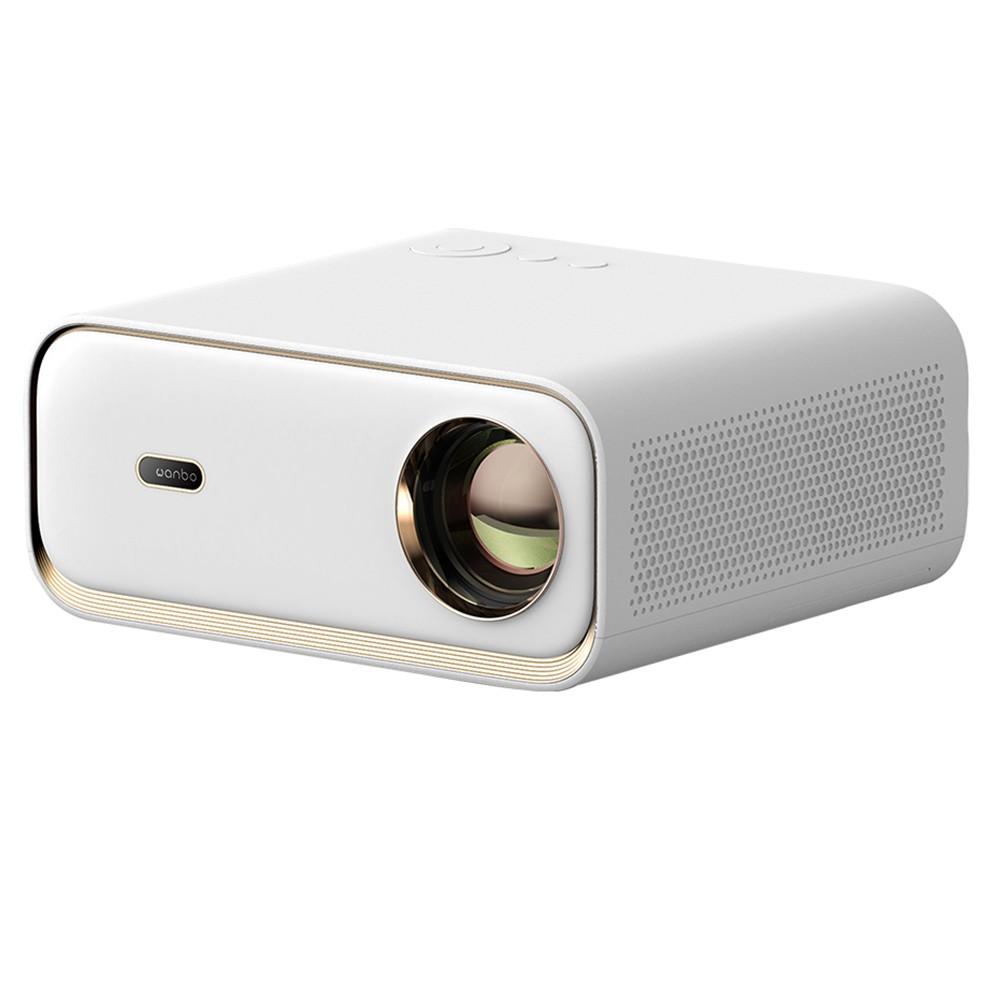
Unlike many well-known Wanbo projectors, the X5 model comes with the traditional wide-style projector design. Its dimensions are 265 x 235 x 119 mm with a total weight of 2.6 kg.

It’s white with golden elements, which gives it an elegant look. It’s made of plastic, but it feels solid and well-made.
As for the layout of the individual parts, the front houses the light source and the brand logo, where the sensor for automatic image focus is located.

The sides feature speaker grilles, while on the back you’ll find a cooling grille and the various ports. Here you’ll get a pair of USB 2.0 ports, HDMI, AV IN, and a 3.5 mm port for headphones.

On the top, you’ll also find control buttons, which isn’t common with the latest projectors. Since there are four directional buttons with a center button for confirmation, a back button, and a power on/off button, you can control the projector almost fully even without the remote control.

The bottom has folding support feet, which let you tilt the projector slightly upward. There are also ceiling-mount threads, but they’re hidden under the rubber feet. There’s also a pull-out filter on the side that catches dust.
High brightness
The new Wanbo X5 will impress despite its relatively low price with an exceptionally high brightness of up to 1100 ANSI lumens. Even the Wanbo Mozart we tested recently had higher brightness—specifically 900 ANSI lumens, which was already quite decent.

The Chinese manufacturer pushes this limit even a bit higher, making the picture clearer and letting you use the projector during the day without any significant room dimming. However, compared to the Mozart model, the difference isn’t really clearly noticeable—in writing this review we unfortunately didn’t have the mentioned model available for a direct side-by-side comparison.

So the Wanbo X5 can project even during the day, but don’t expect miracles. Without dimming, the image isn’t as striking as when you pull down the blinds—but compared to other cheap projectors, it’s definitely brighter and nicer. Of course, our best projector experience was in the evening, when it already started getting dark outside, or on overcast days.
Image quality, automatic focus and corner correction
The picture quality of the new projector is decent, and the light source here is an LED lamp. The Wanbo X5 offers Full HD resolution of 1920 x 1080 px with an image size from 40 to 120″. In our view, you could also get a slightly larger image at a shorter distance from the wall or screen.

During testing, we projected onto a regular wall at a distance of about 2.2 m, where the image felt a bit smaller compared to other projectors. We’d definitely welcome a larger image at this distance.
According to the manufacturer, at a distance of 1.3 m you get a 40″ diagonal, at 2.6 m it’s 80″, at 4 m it’s 120″, and at 6 m even 180″, even though the specs list a maximum size of 120″. Such discrepancies in parameters are fairly common with Chinese products.

Wanbo X5 supports decoding in 4K quality and the HDR10 technology. The colors are quite vivid, and we appreciate the ability to adjust them in the settings.

Advanced features like automatic focus together with automatic corner adjustment are also available if your projector isn’t positioned perpendicular to the wall. This feature is quite reliable, but like with other projectors, it reduces sharpness in certain areas. So if you’re projecting from a slight angle, the entire image won’t be equally sharp.
You can also change the additional focus manually using the buttons on the remote control, and adjust the corner correction in the settings.
User interface and operating system
The Wanbo X5 projector runs on Android 9 with a user interface similar to Android TV. The user interface is probably the biggest weak point of these Chinese projectors. Official support for Netflix and other streaming platforms is missing, so while you can find them in the Google Play store, you won’t be able to watch movies and series in full resolution.

In terms of design, the interface is the same as on the other newer Wanbo projectors. At the top, you’ll find a menu with search, the home screen, apps, music, video, and settings.
Under this menu there’s a banner with media content options from well-known streaming services, and below it you’ll find the apps themselves. Among the defaults, you’ll find Netflix, Prime Video, Disney+, YouTube, HBO Max, and more, but some are only available as links to download.

In the settings, you’ll find quite a lot of options, from adjusting the projection position, colors, focus, or corner correction via Bluetooth, WiFi, or sound settings. Slovak language is also available, but many terms are translated incorrectly, and above all the settings are quite confusing this way.

Pre-installed apps
All the apps you’ll find in the “My Apps” menu include File Manager, SpeeakerModel, Chrome, Miracast, YouTube, Netflix, OfficeSuite, EShareServer, Prime Video, MX Player, and i Mirror.

You can also install additional apps through one of two app stores: Google Play or the App Store. We like that the manufacturer has pre-installed the web browser Chrome already, which isn’t typical for projectors and TVs.
Another interesting option is OfficeSuite, but working with documents or spreadsheets on a projector using the remote control is rather impractical. So if you want to use such apps, we recommend connecting a mouse and keyboard, or a 2-in-1 combo gadget.

We don’t like a lot of links for installing various apps and multimedia content from different platforms. These links unnecessarily clutter the system, and we’d much rather have a clean system without all those extra links.
Performance, memory, and connectivity
Traditionally, the manufacturer doesn’t provide almost any hardware specifications about the processor or memory in the case of projectors. So the only officially available information is the size of the internal storage: 16 GB, and RAM with a capacity of 1 GB.

The system runs at a pretty good level and we didn’t notice any major hiccups, but overall smoothness and response speed aren’t the best. There’s a noticeable bit of delay when opening apps and when navigating the menu, but it’s nothing too serious. However, responses aren’t as smooth as on TVs, Android TV boxes, or TV sticks.

As for wireless connectivity, the dual-band WiFi on version 6 is a nice surprise. Bluetooth is also present, this time in version 5.0. On the ports on the back, you’ll find 2 x USB 2.0, HDMI, a 3.5 mm headphone jack, and AV IN.
Sound, noise level, and remote control
Speakers often don’t deliver particularly great sound, but with the Wanbo Mozart model we were convinced that even a projector can have solid audio quality. The Wanbo X5 doesn’t fall behind too much—its two 5 W speakers play quite decently and loud enough.

Noise from the projector itself is often an issue, especially with cheap projectors that tend to be loud. The Wanbo X5 produces noise around 35.5 dB (measured at a distance of 1 m from the projector). It’s not that much, but if you sit close to the projector, you can hear the noise.
The remote control remains the same as on the other Wanbo models. It’s white and needs a pair of AAA batteries to work, which aren’t included in the package.

Besides the traditional directional buttons with a confirmation button in the center, you’ll also find, for example, buttons for focusing, entering settings, calling up the settings menu, or switching to cursor-mouse control.
The remote control is very well made—its buttons are rubberized, they press nicely, have a good response, and overall the remote feels very comfortable in your hand.
Multimedia content playback options
Nowadays, the most popular choices are probably various apps from TV channel providers and streaming services, where you can find different movies and series.

As we mentioned, there’s no official Netflix certification, so you can’t enjoy its content in full quality. We did have the chance to test the Antik TV app, and it works without any issues.
Screen mirroring from your smartphone also works, as does playback via a USB flash drive. Because of the lack of certification, the best option is probably connecting an Android TV or Google TV TV stick—through it, you’ll enjoy the projector more than via the preinstalled system.
Wanbo X5: Final assessment
The Wanbo X5 LED projector impresses mainly with its excellent price-to-specs ratio, where the most tempting part is the high brightness up to 1100 ANSI lumens. Thanks to that, the image is bright enough and you can use the projector even during the day with slight room dimming.

The overall image quality is good—colors are vivid and you’ll appreciate features like automatic focusing and automatic corner correction. The sound quality is also solid, and we praise the excellent remote control.
However, there are also downsides. One of them is the system—it mostly works smoothly, but it isn’t perfectly fast and it includes several unnecessary links to apps and multimedia content. You should also be prepared for slightly higher noise levels.
The price-to-quality ratio is still very good, which is why the Wanbo X5 is definitely worth considering. If you’re willing to tolerate minor imperfections and you’re not among the most demanding users, you’ll be happy with the projector.
Don’t miss the best coupons 📩
Subscribe and we’ll email you new coupons before they expire. We only send it once a month — no spam.


Discussion (3)
Mounting on the console is possible thanks to the M5 threads under the rubber feet
Yes, we’ve already added it to the review 🙂
The projector’s strongest point is really fantastic picture quality in this price category. The weakest part is the Android system with a terrible launcher. If at least there were an option on the remote to switch the input format directly via the Source button. Many streaming apps don’t work under the system. You can install them, sure, but after starting they automatically shut down after a short time and return to the basic menu, which can’t be customized in any way—at least not like Android TV, where you could place links to your favorite apps on the home screen. I was also pleasantly surprised by the sound quality compared to the previous units. I understand WiFi6, but I would have preferred the option to connect directly via cable much more. The bonus screen included with the projector in the price was also a nice surprise.