


Verdict: Goat Bot Unicut H1
Our editorial rating is based on product testing.
- High-quality lawn mowing
- Seamless return to the charging station
- No boundary wires
- Decent battery life on a single charge
- Unable to upload 4G data
- Weak app
- No option to choose a mowing zone
- Not suitable for all types of properties
Robotic mowers are constantly improving, and there are already several brands and models that use satellite technology as well as object detection using a camera and various sensors, completely eliminating the need for boundary wires. This also includes the 2025 novelty from our partner Geekbuying – Goat Bot Unicut H1 with an RTK antenna, which you’ll learn more about in this review.
Its main advantages include navigation using satellite systems, AI object detection, very good mowing quality, and according to the manufacturer it’s suitable for areas up to 1500 m². However, it also has its downsides and little issues—after all, it’s a true blue Chinese model. You’ll find out everything below in the review.
We also add similar gadgets on our FB
Where to buy it?
You can find the Goat Bot Unicut H1 robot lawn mower from our most reliable partner Geekbuying, shipped directly from the European warehouse. Great news for you: send us a message via private message or to [email protected] and we’ll provide you with a special coupon, so you can get an extra discount of €200 from the original price of €1299 on the seller’s page! Or copy it directly from Telegram!
Shipping is free, with no additional fees, and it will be delivered in 2 to 7 business days. The seller offers a 2-year warranty and a 1-year warranty for the motor.
Goat Bot Unicut H1
 PL warehouse
TIPExpress delivery from the Polish warehouse with no customs duty and VAT.
This product will be delivered to you express from a local Polish warehouse. Delivery from Poland usually takes 7–10 days and is handled by a courier. When it’s delivered, you won’t pay any additional fees—no customs duty and no VAT.
Technical specifications
| - | Goat Bot Unicut H1 |
|---|---|
| Type | without boundary wires |
| Color | White / Black-yellow |
| Weight | 10 kg (package approx. 20.5 kg) |
| Dimensions | 602 x 414 x 260 mm |
| Maximum area | 1500 m² |
| Clearing width | 24 cm |
| Mowing height | adjustable 25 – 65 mm |
| Maximum incline | 45 % |
| Mowing speed | 0.4 m/s |
| Motor | Brushless |
| Battery | Li-ion 5.1 Ah |
| Runtime on a single charge | up to 2 hours (real approx. 800 m²) |
| Charging time | 120 minutes |
| Noise level | less than 59 dB |
| Water resistance | IPX6 (mower and station) / RTK station IPX7 |
| Navigation | RTK + VSLAM + ODO + IMU (GFLS SLAM; accuracy 1 cm) |
| Sensors | Rain sensor / obstacle detection (AI Vision + TOF) / tilt sensor |
| Connection type | Bluetooth; Wi-Fi; 4G |
| App | Scheduling support; map building; OTA updates |
| Package contents | Robotic mower; charging station; RTK station; 9 spare razor blades; 2x 10 m cable; adapters; manual |
In the box and first impression
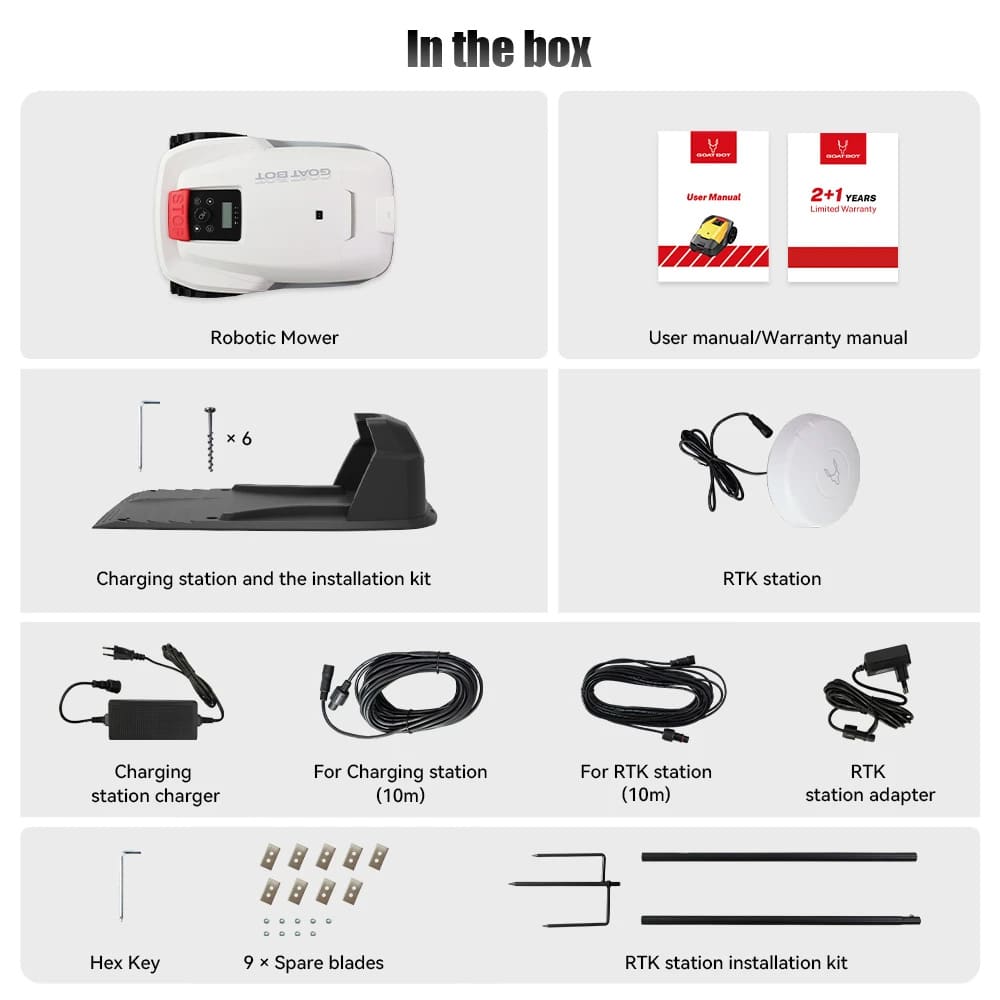
The Goat Bot Unicut H1 mower is packed really well and protected during shipping. It arrived in a double box and nothing was damaged—each component had its own place. In the package, besides the mower and charging station, we also found 9 spare razor blades, the RTK station, a power adapter, an RTK power adapter, one 10-meter charging cable, a second 10-meter cable for extension as needed, a user manual, and a warranty card. Overall, the package weighs 20.5 kg, which reflects the device’s sturdiness and the quality of the included accessories.
Design and build quality
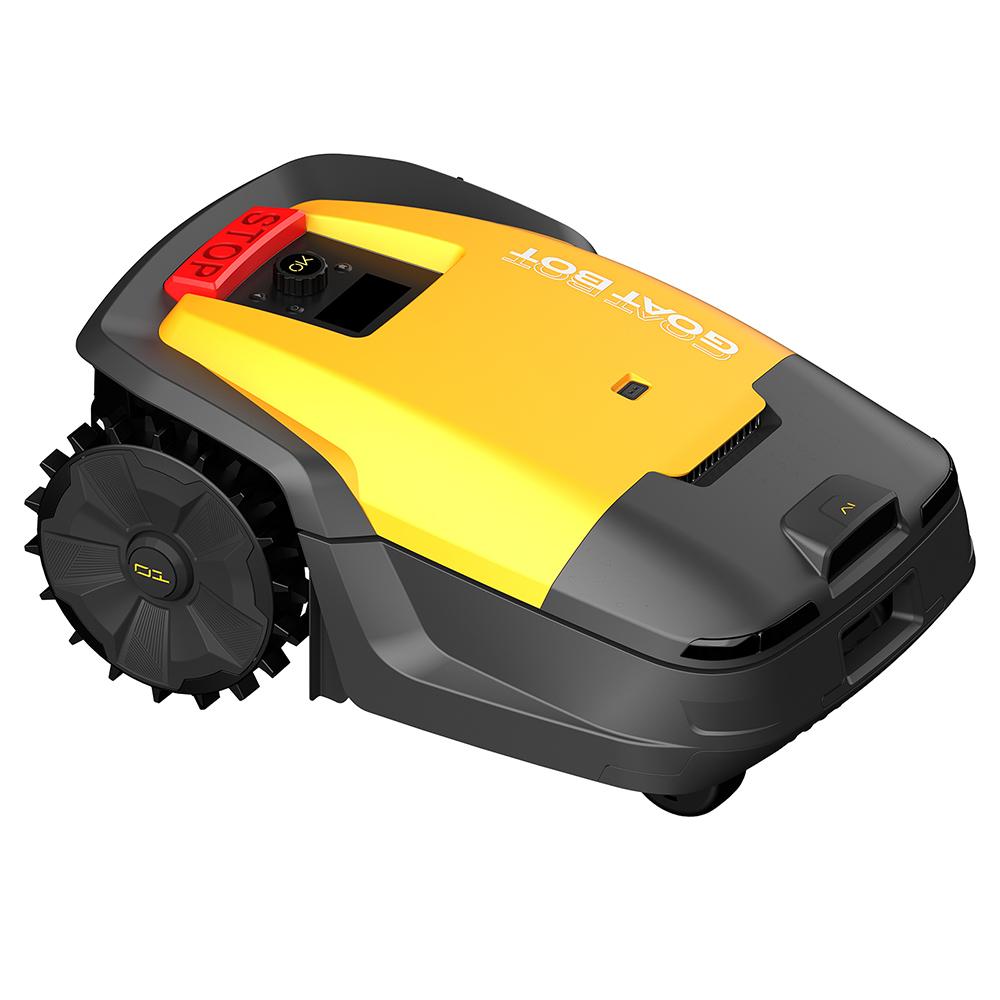
Goat Bot Unicut H1 is available in two color variants – elegant white and bold black-and-yellow. We specifically tested the black-and-yellow version, which looks modern, but wear, scratches, and dirt are visible on it right away. The top features a display with control elements and a large STOP button for emergency stopping. However, the manufacturer could have considered better protection for the control panel from rain or dust, since this area is not covered.


For this reason, it won’t hurt at all to place the mower with a charging station under a covered area, or at least always keep it out of the way when there’s heavier rainfall.
On the top you’ll also find a rain sensor that automatically sends the mower back to the station when it starts raining. The front is highlighted by a prominent camera and obstacle-detection sensors that monitor the surroundings. The mower’s dimensions are 60 cm long, 42 cm wide, and 26 cm high. The rear wheels are large with an aggressive tread pattern, which significantly improves traction in wetter conditions as well as when mowing on slopes.

The bottom section includes two helper wheels, the cutting blades themselves, and the mowing motor. This area is the most prone to getting clogged with grass, so regular maintenance is important. Already after the very first mowing session, we had to clean the blades from grass that had stuck to them.
Installation and first setup
The first step was to place the charging station in a spot where there’s at least half a meter of free space on both the left and right sides, and nothing blocks access from the front. The RTK antenna needs an unobstructed view of the sky; ideally, it should be mounted on an elevated spot away from obstacles and not directly by the building—we recommend placing it, for example, on the house roof or a balcony. The cabling is long enough, giving you freedom when choosing the installation location. The RTK antenna can be powered using a dedicated adapter from the package or via the secondary port on the charging station.

The mower’s initial setup isn’t the most intuitive, so we recommend studying the manual in detail. After downloading the app, you can add the mower via Bluetooth, and then the Wi-Fi connection setup takes place. If Wi-Fi isn’t available, you can use the built-in 4G network, but the manufacturer only provides 100 MB of data with no option to purchase additional data. That means there’s a built-in eSIM module somewhere, but the manufacturer provides absolutely no information about which operator it uses or how it works. It’s quite confusing and a bit hard to understand.


On the control panel, you’ll find four indicator lights signaling 4G, connection to the RTK antenna, Wi-Fi, and power—normally, the power indicator should always be on, along with RTK and either one of the Wi-Fi or 4G indicators; otherwise, it’s not possible to monitor the mower through the app. Based on our testing, the mower can also work without an internet connection, but then you can’t monitor it via the app.

App, mapping, and control
The app is functional at its core, but from the design and feature standpoint, there’s clearly room for improvement. In short—it's basically limited to map management, you can control the start of mowing (the mower chooses the starting point and zone by itself), set the mowing height during mowing, activate the rain sensor, and that’s pretty much it. Of course, mowing can be stopped and the mower can be sent back to the charging station, but further, more detailed settings are hard to find.


The settings include OTA updates, an overview of available 4G data, the firmware version with an update, an electronic manual, and Wi-Fi connection settings. The main screen shows the property map, battery status, mowing progress, and the next task.


Initial mapping
After the initial pairing, you need to create a map of the property—that’s done manually, like with other models, using the joystick in the app, where you guide the mower along the edges of the lawn and mark the entire zone. The manufacturer doesn’t state a recommended distance from the edge, but based on our experience we recommend at least 3 cm.

After creating the main zone, you need to mark the areas where mowing should not happen (for example, around trees or garden furniture). If you have multiple separate grass areas, you’ll need to create a new zone for each one. For these zones, it’s also necessary to mark the transition paths. For more complex properties with multiple zones, we recommend planning their connections carefully—transitions should be obstacle-free and without significant inclines.

Mapping is simple and fast—the app offers three modes: creating zones, linking zones, and setting dedicated no-go areas. With the right mapping, mowing is efficient and quick. However, with insufficient boundaries, the mower doesn’t handle it well and works less efficiently.

Missing zone selection
We’re sorry that the app doesn’t allow you to select a specific zone for mowing—the mower always mows the entire property based on its own choice, without any option to decide where to start or finish.
It happened to us that we had to stop the mower in an emergency because it got stuck under the garden vehicle (Piaggio 🙂), and then manually carry it back to the station—so the mowing progress was lost. In that case, the mower kept mowing over the same area from the beginning until it finally reached the places that hadn’t been mowed yet.
Mowing planning
In the app, you can set up scheduled mowing, which lets you achieve a certain level of automation. You can create a command to start mowing at certain day intervals and at a specific hour. That means you don’t have to manually start the mower every day if someone needs it to run daily.
Missing password setting
In the app or on the mower itself, there’s no option to change the password to unlock the mower. This is something we absolutely don’t understand, and we’d really like to know what the Chinese engineers were thinking while building the Goat Boat Unicut H1. They offer anti-theft protection, but once you turn it on, the password is automatically shown on the display—you just need to click the OK button.
If you wanted to rely on this kind of anti-theft protection, at least for now it’s not possible. We hope this will be one of the first fixes included in an update to the app and the mower’s firmware.
Mowing and work quality
The mowing itself was truly excellent on our Goat Bot Unicut H1. You can set mowing height in the range of 25 to 65 mm, and we got the best results at around 3.5 cm. The mower’s cutting width is 24 cm and the maximum movement speed is 0.4 m/s, which is more than enough in our opinion.

The mower uses RTK + VSLAM navigation combined with additional sensors (ODO, IMU), which makes mapping and positioning precision accurate down to the centimeter. During testing, we noticed the mower never got lost and didn’t require any user intervention. On rectangular or square properties, it mows very effectively even in corners and along the edges.

On more complex or irregular property shapes with different obstacles and unevenness, the mower may have trouble moving smoothly. This shows up as frequent turning or smaller inaccuracies when mowing the edges. Here, too, thorough initial mapping is the foundation.
During operation, we were pleasantly surprised by the low noise level under 59 dB, which you’ll appreciate especially during longer mowing sessions near the house or during rest time. So the mower is also suitable for densely built-up areas where peace and quiet matter.
AI obstacle avoidance and safety
The manufacturer claims advanced AI obstacle detection based on a camera and multiple sensors. In practice, the mower reliably avoided objects—trees, pets, a ball, and various toys. We can’t judge to what extent this is actually “artificial intelligence” versus just a combination of simpler algorithms, but what matters is whether it works well in real use. The mower responds quickly, doesn’t get stuck on obstacles, and when detecting larger objects, it prefers to go around with a wider arc.

Safety is enhanced by an emergency STOP button, electronic and mechanical sensors, and automatic return to the station in case of rain or other issues. Another big plus is the protection of hedgehogs and small animals that the manufacturer claims.
Battery life & charging
A lithium battery with a capacity of 5.1 Ah can run for about 2 hours on a single charge, while charging takes around 120 minutes. The declared maximum power for 1500 m² seems exaggerated based on our experience — in real conditions with a uneven yard and obstacles, we mowed about 800 m² on one charge; a larger property would be handled in 2 cycles depending on the terrain.

The mower always returned to the station without any issues, where it automatically charges the battery. We appreciate that charging is fully automatic, works very reliably, and during the test it never failed to return.
Terrain accessibility and usability
The mower has high torque and rear offroad wheels with a distinct “tread pattern”, allowing it to handle slopes up to 45%. In practice, this means trouble-free mowing even on gentle hills, around sloped garden beds, or in more challenging terrain after rain. The manufacturer uses high-quality brushless motors and the entire chassis feels solid and durable.

Connectivity and remote control
The mower supports 4G, Wi‑Fi, and Bluetooth connections. Our best experience was with Wi‑Fi — the range is very good, and the mower stayed online even in places where your smartphone had no signal. In the current version, 4G connectivity is very limited due to lack of data, which we hope the manufacturer will improve in the future. For remote monitoring, the mower must be connected through at least one network; otherwise, it’s not possible to track progress and control it via the app.
Bluetooth is only used for initial setup. If you need to change the Wi‑Fi network, the switching is done via Bluetooth. You need to press the “Play” button for 3 seconds, which puts the mower into BT pairing mode, and after connecting you can either select the Wi‑Fi network settings or choose the 4G mode.
Software options and updates
Goat Bot Unicut H1 supports OTA updates, and all key components can be updated remotely. However, its software page still lags behind competing brands like Mammotion or Dreame, where you can set more mowing modes, edge detection, and choose zones individually. A nice bonus is the option for self-diagnostics, predictive fault alerts, and remote diagnostics via the cloud, which the manufacturer states.

Maintenance-free design and service
We consider it a major plus that the construction is modular and that it includes advanced self-diagnostic functions, allowing the mower to anticipate and report potential problems. Access to the blades is straightforward, and replacement takes just a few minutes. The manufacturer claims a high docking success rate on the first attempt, which we can confirm from experience.

Who is the mower suitable for?
It’s really key to consider the type of your yard and the quality of your lawn to determine whether a smaller robotic mower like the Goat Boat Unicut H1 is a good fit. Even the best competing models would likely struggle with rough terrain, tall weeds, or edges where it’s easy to get stuck. It will also have trouble with narrow areas; it needs at least about a meter of space to be able to turn.

Our recommendation is as follows – a well-kept, level lawn; well-accessible edges without slopes (otherwise you’ll need to finish them manually); and ideally Wi‑Fi coverage across the entire yard, but especially GPS signal. If you have narrower strips of grass than 1 meter on your property, you should be prepared for the fact that the mower probably won’t be able to reach them.
We tested the mower on two different plots. The first plot had exactly the problem of narrow spaces, and the mower couldn’t get between the dense flower planting, so these narrower areas would need to be finished with manual mowing. It also had trouble with the edges on one side, because there was a slight slope there and decorative bark continued on. The second type of plot was simple – a rectangular garden. Here, the Goat Bot Unicut H1 really proved itself as a handy helper, handling obstacles like garden seating and leaving almost no area uncut.


Final assessment: Goat Boat Unicut H1
Goat Bot Unicut H1 is especially recommended for owners of medium to larger gardens with easier access, where there aren’t many obstacles and narrow strips of grass under one meter are less common. With a properly created map, the mower cuts very precisely, returns to the station without any issues, and can also handle smaller slopes. If some of the missing features in the app don’t suit you and they’re important to you, it would definitely be worth considering another brand such as Mammotion or Dreame A1.

Despite its drawbacks, however, the Goat Boat Unicut H1 in the category of robotic mowers with RTK navigation is among the most affordable solutions, offering a very solid price-to-performance ratio.
If we’ve convinced you to buy this lawn mower, you can do so through the retailer Geekbuying.
Goat Bot Unicut H1
PL warehouseTIPExpress delivery from the Polish warehouse with no customs duty and VAT.
This product will be delivered to you express from a local Polish warehouse. Delivery from Poland usually takes 7–10 days and is handled by a courier. When it’s delivered, you won’t pay any additional fees—no customs duty and no VAT.
Follow the China Planet website, sign up for our monthly newsletter, and make sure you also follow our Facebook page, the group All from EU warehouses, and join our Telegram—where we add the best deals and coupons from China day after day.
Don’t miss the best coupons 📩
Subscribe and we’ll email you new coupons before they expire. We only send it once a month — no spam.


Discussion (0)