


Verdict: KingSmith WalkingPad X21
Our editorial rating is based on product testing.
- metal frame and overall high build quality
- folding construction, so it doesn’t take up much space for storage
- a clear display on the top part of the handle
- ability to connect to a smartphone
- quiet operation of the belt itself
- missing storage for the power cable
- high weight
- non-functional NFC tag on the handle
Nowadays, many of you definitely have a desk job. At the same time, as summer comes to an end and winter is approaching, it’s the perfect time to make sure you have the right home workout equipment ready. The WalkingPad X21 treadmill can be one of them.
WalkingPad X21 is made by the Chinese brand KingSmith, which belongs to the Xiaomi ecosystem. In their lineup, they have several different types of treadmills. The new WalkingPad X21 ranks among the top models in the brand.
Where to buy the WalkingPad X21?
You can purchase the KingSmith WalkingPad X21 from our reliable international partner. Enjoy shipping from a European warehouse, so delivery is fast and hassle-free.
WalkingPad X21
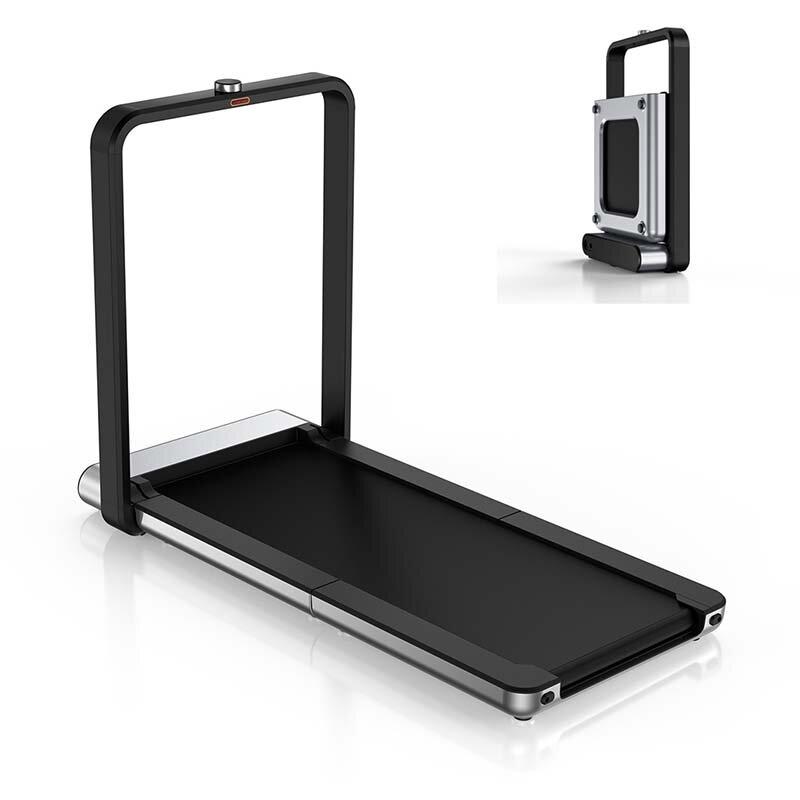
 SK sklad
TIPExpress delivery from the Slovak warehouse within 1 - 3 business days.
This product will be delivered to you express from a local Slovak warehouse. Delivery usually takes 1-3 business days, and it’s handled by a courier. The price is final.
Technical specifications
Model Kingsmith WalkingPad X21 Motor brushless Material ABS + a metal alloy of aluminum Display yes, OLED Power 918 W Speed 0.5 – 12 km/h Foldable mechanism yes Dimensions when folded 710 x 955 x 226 mm Dimensions when unfolded 1420 x 720 x 1020 mm Weight 38 kg
Packaging contents & quality
The WalkingPad X21 was delivered to us by a DPD courier, who asked: “What did you order?”. His curiosity was justified, as it was by far the biggest and heaviest box among the ones he had in the van.
The treadmill is shipped in a truly large box, measuring approximately 110 x 80 x 26 cm and weighing up to 46 kg. Even a stronger guy has his work cut out for carrying such a box somewhere. Fortunately, the helpful courier will assist you.

After unboxing, we found plenty of polystyrene around the folded treadmill, along with a separate cardboard box for accessories. It hides several components—specifically, a holder for a tablet or smartphone, a power cable, an Allen key, silicone oil, a securing cord, and the user manual.

At first glance, the treadmill was packed excellently. On both sides it was protected with polystyrene and wrapped in protective film. Still, one weak spot was found: around the control button with the display, the polystyrene was broken. The display/button area wasn’t well protected, but it didn’t look damaged at first sight.

Build quality and assembly
The WalkingPad X21 treadmill has a metal frame, complemented by ABS plastics. Overall, it feels very high quality, almost premium. It features an industrial design combining black with stainless steel color.

The belt is driven by a brushless, maintenance-free motor with 1 HP power. The motor is located at the front of the construction, and as expected, it uses metal gears. The belt itself is anti-static and anti-slip. Its surface features a fine black texture. Under it, there are several layers of different materials that ensure comfort during use.

When it comes to getting it up and running, no special assembly is required. As we mentioned in the introduction, the treadmill is packed in the box in a folded form—so you just take it out, remove the polystyrene and other protective elements, then unfold the belt into a horizontal position.

The WalkingPad X21 features a dual-folding design, which means that when folded it doesn’t take up much space—despite not being a small strip. In the folded state, it stays upright thanks to a wider base that also includes wheels for easier carrying.
To unfold it, just pull the handle and fold the main section down toward the ground. In this position, the treadmill belt is still folded in half, so you need to flip the second section out into a horizontal position as well.

Inside the box you’ll find a holder for a tablet or smartphone, which attaches easily using a pair of screws from the underside of the metal frame—this same frame also acts like a sort of handle.
First power-on and an unpleasant surprise
Our first power-on came with an unpleasant surprise. We plugged the belt into the power outlet, turned it on using the red button, inserted the fuse, pressed the top button, and only an unreadable square appeared on its display. It was supposed to be a QR code used to pair with the smartphone app.

The broken polystyrene that was meant to protect this rotating knob with the display still managed to take its toll. The button with the display was not working—in our case, it wouldn’t even press—and the display didn’t show information correctly. After a while, it even completely went dark; the red outline lit up, and the belt only beeped.
How we handled the warranty claim
We took photos of the problematic button with the display, recorded a video, and sent the materials to Geekbuying’s support. In their reply, we received an instructional video showing how to disassemble the entire treadmill step by step. Since we suspected the issue was only with the button and the display, we started by removing the top handle section.

After removing the top cover, we disconnected the flex cable going to the display, unscrewed the relevant screws, and removed the button with the display. That’s when we noticed a flex cable jammed inside the button’s internal structure—so the cause was clear. We photographed everything again and sent it to Geekbuying support, which then sent us a new button with a display.

As you can see, the claim was completely hassle-free. Especially with Geekbuying, we’ve had very good experiences when it comes to warranty claims. They’ve sent us accurate, instructional videos on multiple occasions showing how to replace a non-working part. Based on the video, anyone can handle the replacement.
Placement of the components
The treadmill belt has an almost standard design with a handle. On the top part there’s a large LED panel almost across the entire width of the handle. This is where you can see the basic info like speed, distance traveled, workout time, and calories burned.

In the middle of the handle there’s a control button with a small display. Before turning the belt on and using this button, you have to power on the belt using the red button located on the bottom, next to the port for the cable that goes to the power outlet.

Another interesting feature is the stand for a tablet or smartphone, along with a fuse on the front of the handle. It’s attached to a string that the user should clip to the belt using a buckle. If the fuse comes loose, the treadmill will gradually stop operating. If you turn the treadmill on without this fuse, you’ll see a warning on the display.

Pairing with the smartphone app
As is typical, the Xiaomi ecosystem treadmill is categorized as a smart device. It supports technologies like Bluetooth and NFC, and you can pair it with the smartphone app. It’s called KS Fit, and you’ll find it on the Google Play store—or by scanning the QR code from the user manual.

On the Google Play store, the app has very low ratings. At the time of writing this review, it’s only 1.8 out of 5. After registering and successfully signing in, you’re offered the option to add a device. You can add the belt manually by searching for the X21 model under the Treadmill tab. Once you find the treadmill, pairing happens automatically.
Pairing via the NFC tag on the handle just somehow didn’t work for us. When we held the smartphone to that spot, the KS Fit app opened and pairing started, but it was always unsuccessful.
How does the treadmill work, and what options does it offer?
The WalkingPad X21 treadmill can be started from the app or with a rotary dial by pressing it. After three beeps, the belt starts running at 2 km/h and begins measuring time, distance covered, and calories burned.

You can adjust the speed in the range of 0.5 – 12 km/h in steps of 0.1 km/h. If you turn the circular control faster, the speed changes instantly by 1 to 3 km/h. To stop the belt, simply press the button again. Of course, the belt doesn’t stop abruptly, but slows down gradually until it comes to a stop.
Get ready for higher noise levels.
The WalkingPad X21 treadmill is very quiet, but it has a folding construction, which means its stability may not always be perfect. The belt holds together very well, but the ideal setup is an absolutely flat floor.

An uneven floor causes slight flexing at the bend points, so for ideal operation the best option is a perfectly flat surface, or a kind of mat that would dampen the noise while running. At a speed of around 9 km/h, we measured noise of approximately 70 dB during operation.

We tested the belt in an apartment on a laminate floor and we have to admit that the noise carries down to the floor below quite noticeably, because the neighbors from the apartment under us came right away to ask what was going on. Naturally, the noise increases as the running speed on the treadmill goes up.
However, we don’t take this noise as a downside, because it comes more from the nature of using the treadmill – running and the corresponding “stomping” during this activity.
What does the KS Fit app offer?
The app interface is very simple and easy to navigate. The home screen also serves to start a workout or to monitor it. You can activate the treadmill not only with a button but also through the app.


After you finish a workout, the total distance covered is displayed. More detailed data are also available; they show up after you tap on the activity. Here you’ll find the workout duration, distance covered, number of calories burned, average speed, number of steps, cadence, and average pace.


The data in the app are fairly accurate. During a few workouts, we also ran activity tracking on the Mi Band 7 fitness band, which recorded the exact same distance covered. For the other metrics, the differences were minimal.


You can also find information about past workouts along with statistics for different time periods such as day, week, month, year, or overall statistics from all workouts together.
The settings in the app are quite limited, and basically you can only set basic parameters like maximum speed, starting speed, child lock, and units.
Final assessment: KingSmith WalkingPad X21
The KingSmith WalkingPad X21 treadmill is one of the top models in the brand’s lineup. It hides a brushless electric motor with a power of up to 918 W, allowing the treadmill to reach a maximum speed of 12 km/h.

You’ll appreciate the foldable design, which means the treadmill takes up little space when stored, a large and easy-to-read display on the top handle, and the ability to connect with a smartphone app where you can track your progress.
Current coupons for WalkingPad X21
What a shame that the engineers didn’t think about the fact that when storing the treadmill, you also need somewhere to place its power cable. We’re missing a proper spot or compartment where you can tuck the cable away and store the treadmill with it.
Don’t miss the best coupons 📩
Subscribe and we’ll email you new coupons before they expire. We only send it once a month — no spam.


Discussion (0)